SUMMARY:
This issue has been classified as a defect by Strategy. The impact is limited to Strategy Web 10.x product using Tomcat as Web Server, only when subscriptions are created by the Administrator user for other users.
The error message if IIS is used is "The Web Server encountered an unknown runtime error.
An error has occurred on this page."
A solution/code fix for this issue is available in Strategy 10.3.
SYMPTOM:
In Strategy Web 10.x, when a user executes a report/document from their My Subscriptions page, the following error appears:

Error in document result
Pemature end of file.
An error occurred on this page.
Your request could not be processed due to a server error. Please try again. If the problem persists, contact the server administrator
STEPS TO REPRODUCE:
Follow the steps below to reproduce this issue in the Strategy Tutorial project for reference:
1. in Developer, navigate to Public Objects\Reports\Documents and Scorecards
2. RMC on !!! Monthly Regional Sales Targets Planning (Transaction Services) > Schedule Delivery To > History List
3. in the History List Editor:
a. Schedule at Close of Business
b. to Peter Rose (remove the Administrator from the recipient list)
c. Advanced Options:
i. Allow recipients to change delivery settings
ii. Allow unsubscribe
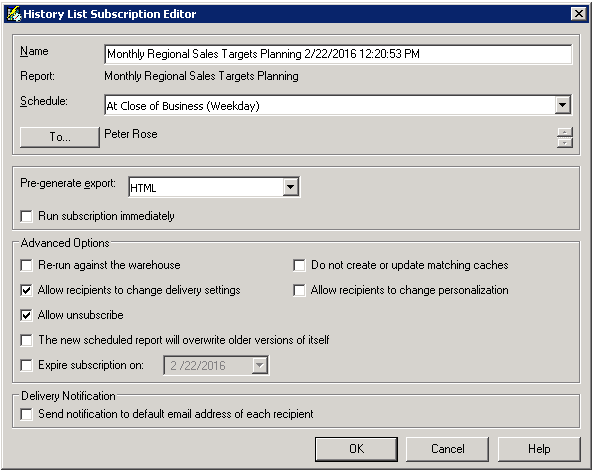
4. login to Web as user Prose
5. go to My Subscriptions and click on the document in order to execute it
6. notice the error message
CAUSE:
This is an identified defect in Strategy Web 10.x due to empty delta that causes a problem in the code
ACTION:
This issue has been addressed in Strategy 10.3; please update to this version to benefit from the fix.
KB283546
