SUMMARY:
This issue has been classified as a defect by Strategy. The impact is limited to Strategy Web 10.x product only in Interactive and Editable Mode. A workaround is available in the current document. A code fix for this issue was also made available in Strategy 10.3.
SYMPTOM:
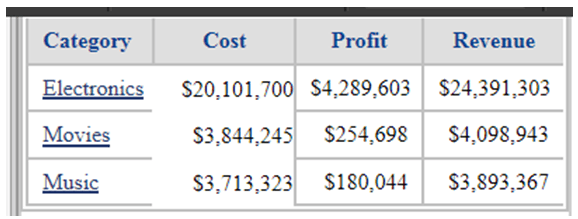
In Strategy Web 10.x, the borders of the cells of the first of more columns are missing in Interactive Mode or Editable Mode, as shown below:
STEPS TO REPRODUCE:
Follow the steps below to reproduce this issue in the Strategy Tutorial project for reference:
1. in Developer, create a report with Category in the rows; Cost, profit and Revenue in the columns
2. in Grid Options / Columns and Rows, set the columns fixed to 0 pixels
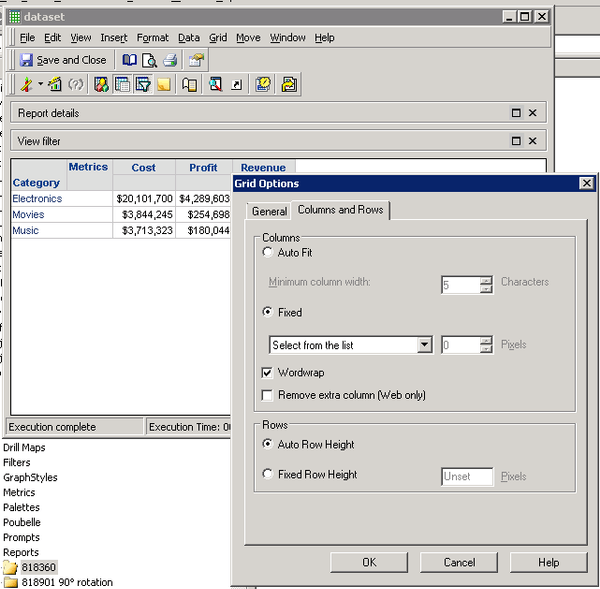
3. create a document off of the report and edit it in in Strategy Web
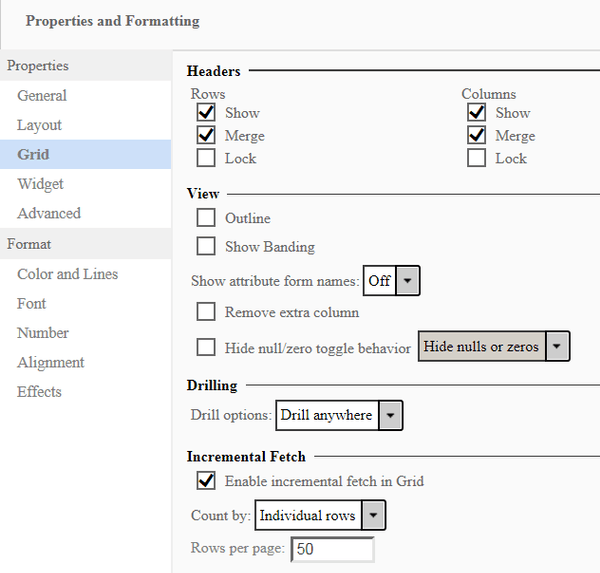
4. in Format menu > Properties and Formatting / Grid, leave the Remove Extra Column checkbox blank
5. in Edit Mode, click on the grid and select Resize Columns and Rows. Set the columns to Fixed for Column Axis Header(s) with width = 0 inches
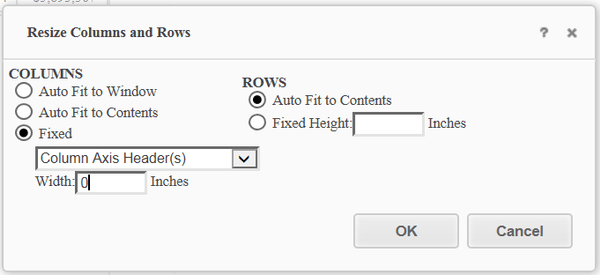
6. notice the cell borders disappear in the first column
CAUSE:
This issue has been identified as a defect in Strategy Web 10.x.
ACTION:
This issue has been addressed in Strategy 10.3; please update to this version to benefit from the fix.
WORKAROUND:
Check the "remove extra column" option.
