Starting with Strategy 10.3 Secure Enterprise Platform, embedded HTML tags in text fields and HTML containers can be rendered when exporting from Report Services Documents or Visual Insight dashboards to PDF. The following HTML tags are supported:
This feature is not enabled by default. To enable this feature, a registry edit is required. Users should be sure to make a backup of the Windows registry or MSIReg.reg file before performing any modifications.
For Windows environments (including Strategy Intelligence Server and Strategy Desktop):
1. Stop the Strategy Intelligence Server (or Desktop application)
2. Open the Windows Registry Editor
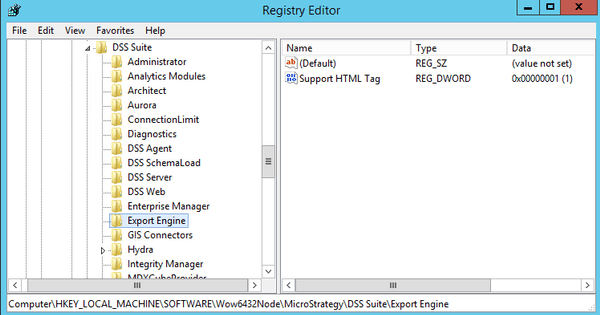
3. Add a new key "Export Engine" at:
HKEY_LOCAL_MACHINE\SOFTWARE\Wow6432Node\Strategy\DSS Suite
HKEY_LOCAL_MACHINE\SOFTWARE\Wow6432Node\Strategy\DSS Suite\Export Engine
For Linux/UNIX environments (Strategy Intelligence Server only):
1. Stop the Strategy Intelligence Server
2. Open the MSIReg.reg file in a text editor (this file is located in the <MSTR_HOME> folder; /var/opt/MicroStrategy/ by default)
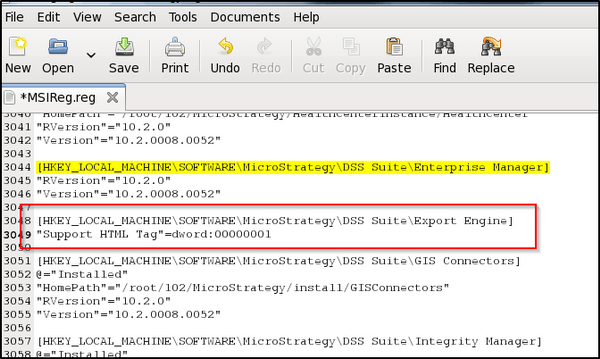
3. Locate the following entry:
[HKEY_LOCAL_MACHINE\SOFTWARE\Strategy\DSS Suite\Enterprise Manager]
[HKEY_LOCAL_MACHINE\SOFTWARE\Strategy\DSS Suite\Export Engine]
"Support HTML Tag"=dword:00000001
For Mac environments (Strategy Desktop only):
1. Exit the Strategy Desktop app completely
2. Right-click the app and click "show package contents"
3. Find MSIReg.reg in the Contents folder and open it in a text editor
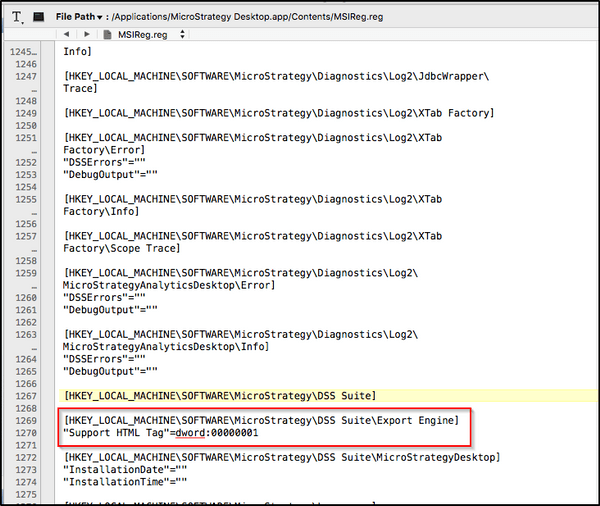
4. Locate the following entry:
[HKEY_LOCAL_MACHINE\SOFTWARE\Strategy\DSS Suite]
[HKEY_LOCAL_MACHINE\SOFTWARE\Strategy\DSS Suite\Export Engine]
"Support HTML Tag"=dword:00000001
Registry Modification:
WARNING:
Modifying registry values incorrectly may cause serious, system-wide problems that may require the re-installation of Microsoft Windows or Strategy installations on UNIX/Linux operating systems. Any edit of the registry is done at the user's own risk. Since these are user-initiated changes, they are not covered by any Strategy warranty. If using Microsoft Windows NT, the user should backup the registry and/or update an Emergency Repair Disk (ERD) prior to alterations.
