EducationSoftwareStrategy.com
StrategyCommunity

Knowledge Base

Product

Community

Knowledge Base

TopicsBrowse ArticlesDeveloper Zone

Product

Download SoftwareProduct DocumentationSecurity Hub

Education

Tutorial VideosSolution GalleryEducation courses

Community

GuidelinesGrandmastersEvents
x_social-icon_white.svglinkedin_social-icon_white.svg
Strategy logoCommunity

© Strategy Inc. All Rights Reserved.

LegalTerms of UsePrivacy Policy
  1. Home
  2. Topics

KB286744: Selecting Boarders 'None' for an HTML Container will revert back to 'All' after saving in MicroStrategy Web 10.


Community Admin

• Strategy


SYMPTOM:
In Strategy Web 10, users have the option to insert an HTML or iFrame object into a document. However in the properties and formatting pane, when users select the "None" option for borders, the selection is not saved. When the document is executed, the HTML does not have borders. So the feature does work, but the option is not reflected in the properties and formatting. 
 
Selecting None, as shown below:

ka04W000000OeBdQAK_0EM4400000025R9.jpeg

Users select "None"
Reverts back to All:
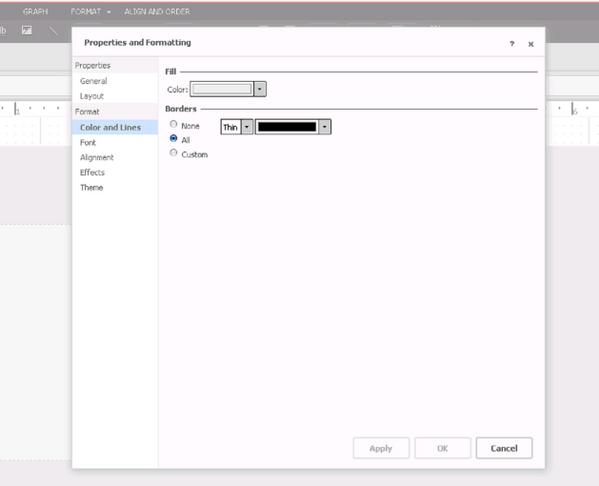
ka04W000000OeBdQAK_0EM4400000025RC.jpeg

Option always reverts to "All"
 STEPS TO REPRODUCE:

  • Create a Report Service Document and insert an HTML container in the document.
  • In Design or Editable mode, right click on the HTML container and navigate to properties and formatting.
  • In the properties and formatting window, go to "Color and lines" under the format options.
  • Under borders, select "None". Apply and save the document.
  • Notice that the property always resets back to "All". The option to have no borders seems to not be available. However the HTML container does not have borders, as shown below. 
ka04W000000OeBdQAK_0EM4400000025RG.jpeg
  • Feature does work. Notice HTML container has no borders.
    Compare it to an HTML container with boarders, as shown below:
ka04W000000OeBdQAK_0EM4400000025R8.jpeg
  • This is how the HTML container would look if the border was actually set to black.

 
CAUSE:
This is an identified defect in Strategy Web 10.
 
ACTION:
This issue has been addressed in Strategy Web 10.4. Upgrade to this version to take advantage of this fix.
 
The Strategy Internal Reference Number for the issue discussed in this technical note is DE30571.


Comment

0 comments

Details

Knowledge Article

Published:

June 13, 2017

Last Updated:

June 13, 2017