EducationSoftwareStrategy.com
StrategyCommunity

Knowledge Base

Product

Community

Knowledge Base

TopicsBrowse ArticlesDeveloper Zone

Product

Download SoftwareProduct DocumentationSecurity Hub

Education

Tutorial VideosSolution GalleryEducation courses

Community

GuidelinesGrandmastersEvents
x_social-icon_white.svglinkedin_social-icon_white.svg
Strategy logoCommunity

© Strategy Inc. All Rights Reserved.

LegalTerms of UsePrivacy Policy
  1. Home
  2. Topics

KB287112: A 'Link to history list in email' subscription for a Visual Insight dashboard renders as a Report Services Document in MicroStrategy Distribution Services 10.1 and 10.2


Community Admin

• Strategy


SYMPTOM:
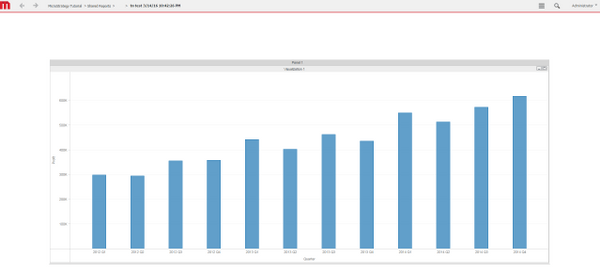
A user can create a history list subscription for a Visual Insight dashboard to be delivered on a schedule to a designated user's email. The email will contain a URL API link to the dashboard, however, in Strategy Distribution Services 10.1 and 10.2, the link sent to the user will take the user to a Report Services Document version of the visual insight dashboard, instead, as shown below:
Dashboard executed in Presentation mode instead.
ka04W000000OeLnQAK_0EM4400000029Bq.jpeg

 
STEPS TO REPRODUCE:

  • Create a garph in Visual Insight and save the dashboard.
  • From the File menu, select > Add to History list and Schedule Delivery to Email, as shown below:
ka04W000000OeLnQAK_0EM4400000029Bk.jpeg
  • In the E-mail subscription page define an email address recipient and change 'Send' to 'Link to history list in email', like shown below:
ka04W000000OeLnQAK_0EM4400000029Br.jpeg
  • Check 'Send a preview now' and click OK.
  • Go to the designated email address, open the email, and click the link 'Link to history list'.
  • The link opens as an RS document and not a VI dashboard.

 
CAUSE:
This is an identified defect in Strategy Distribution Services 10.1 and 10.2 caused by the generation of the link with the wrong event ID.
 
ACTION:
This issue has been addressed in Strategy Web 10.3. Upgrade to this version to take advantage of this fix.
 
WORKAROUND:
After clicking on the 'Link to history list' change the event ID in the URL from evt=2048001 to evt=3140, as shown below:

ka04W000000OeLnQAK_0EM4400000029Bs.jpeg


ka04W000000OeLnQAK_0EM4400000029Bo.jpeg

The link should now render in Visual Insight. 
 
The Strategy Internal Reference Number for the issue discussed in this technical note is DE26334.


Comment

0 comments

Details

Knowledge Article

Published:

June 12, 2017

Last Updated:

June 12, 2017