EducationSoftwareStrategy.com
StrategyCommunity

Knowledge Base

Product

Community

Knowledge Base

TopicsBrowse ArticlesDeveloper Zone

Product

Download SoftwareProduct DocumentationSecurity Hub

Education

Tutorial VideosSolution GalleryEducation courses

Community

GuidelinesGrandmastersEvents
x_social-icon_white.svglinkedin_social-icon_white.svg
Strategy logoCommunity

© Strategy Inc. All Rights Reserved.

LegalTerms of UsePrivacy Policy
  1. Home
  2. Topics

KB287126: Adding a derived attribute as a filter in Visual Insight dashboard causes Intelligence Server to crash in version 10.1


Community Admin

• Strategy


This article describes a situation where using a derived attribute based on an existing metric as a filter on a Visual Insight dashboard causes the Intelligence Server to crash.

SUMMARY: 
This article describes a situation where using a derived attribute based on an existing metric as a filter on a Visual Insight dashboard causes the Intelligence Server to crash. This behavior has been logged as a Defect by Strategy Technical Support for version 10.1, and it is currently being evaluated for a potential fix in a future version. 
 
SYMPTOM: 
When user takes a metric to create a derived attribute (Duplicate as attribute) in Visual Insight in version 10.1, adding the newly created derived attribute to visualization as a filter will suddenly cause a crash of the Intelligence Server. This issue is observed when the metrics and attributes used come from metadata objects instead of coming from a particular dataset such as an existing report. 
STEPS TO REPRODUCE: 

  • Open a new Visual Insight dashboard in version 10.1 Tutorial via Web
  • Under dashboard datasets selection panel, click on "Browse All Objects"
  • Select "Category" and "Subcategory" and add both attributes to row
  • Select "Customer Count" and "Item Count" and add both metrics to the Metrics field:

ka04W000000Ohg0QAC_0EM4400000025Vj.jpeg
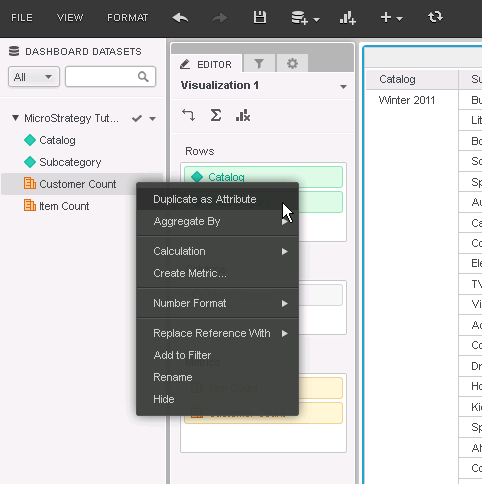
  • Under datasets panel, right-click on "Customer Count" metric and select "Duplicate as attribute":
ka04W000000Ohg0QAC_0EM4400000025VX.jpeg
  • Notice a derived attribute named "Customer Count" gets created and added to the list of attributes:
  • Now right-click on the "Customer Count" attribute and then select Add to Filter:
ka04W000000Ohg0QAC_0EM4400000025Vi.jpeg
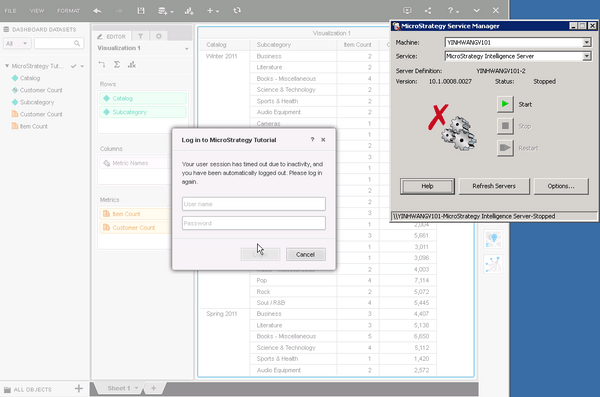
  • Notice the Intelligence Server has crashed and the user is prompted to re-login:

ka04W000000Ohg0QAC_0EM4400000025Vh.jpeg

CAUSE:
This issue is currently being investigated by Strategy Technology and has been deemed as a Defect in the product for version 10.1. 
ACTION: 
This issue has been addressed in version 10.3 for newly created dashboards. For migrated dashboards from a previous version this issue has been fixed in version 10.4.
Please upgrade to take advantage of the fix.


Comment

0 comments

Details

Knowledge Article

Published:

April 26, 2017

Last Updated:

April 26, 2017