EducationSoftwareStrategy.com
StrategyCommunity

Knowledge Base

Product

Community

Knowledge Base

TopicsBrowse ArticlesDeveloper Zone

Product

Download SoftwareProduct DocumentationSecurity Hub

Education

Tutorial VideosSolution GalleryEducation courses

Community

GuidelinesGrandmastersEvents
x_social-icon_white.svglinkedin_social-icon_white.svg
Strategy logoCommunity

© Strategy Inc. All Rights Reserved.

LegalTerms of UsePrivacy Policy
  1. Home
  2. Topics

KB287134: Creating custom groups based on attribute elements does not display correct results on Visual Insight Dashboard in Web 10.1


Community Admin

• Strategy


Creating custom groups based on attribute elements does not display correct results on Visual Insight Dashboard in Web 10.1

SUMMARY: 
This technical note describes a situation where creating a custom group based on selected attribute elements in a Visual Insight dashboard does not correctly display the results. This issue has been logged as a Defect by Strategy Technical Support. A workaround is available and is explained in the "workaround" section of this technical note. 
 
SYMPTOM: 
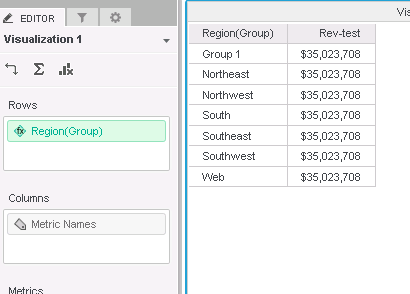
When user creates a custom group based on selected attribute elements in Visual Insight, the final results displayed is incorrect. The results appear to have a dimensionality issue and will display the total of the metric for each row on the grid.  
 
STEPS TO REPRODUCE: 
  • Open the Tutorial Project in version 10.1 Developer. 
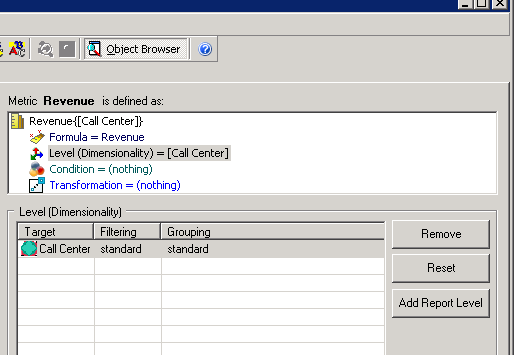
  • Locate the "Revenue" metric and modify its dimensionality so it's set to "Call Center":
ka04W000000OaS5QAK_0EM4400000025VQ.jpeg
  • Save the modified metric as "Rev-test" metric.
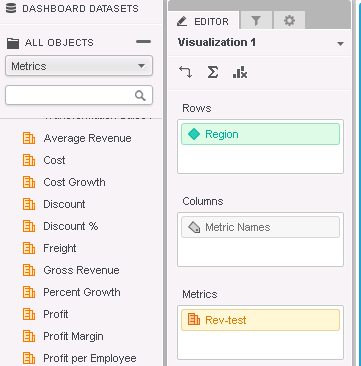
  • Go to Web and create a new Visual Insight dashboard and add "Region" attribute along with our newly created "Rev-test" metric:
ka04W000000OaS5QAK_0EM4400000025VR.jpeg
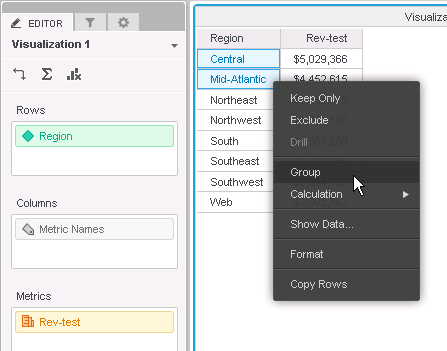
  • Now hold "Ctrl" to select both the Central and Mid-Atlantic regions on the grid, and then right-click to select "Group":
ka04W000000OaS5QAK_0EM4400000025Vg.jpeg
  • Notice the results are incorrect as all rows are displaying "$35,023,708":
ka04W000000OaS5QAK_0EM4400000025VO.jpeg

CAUSE: 
This appears to be a defect caused by Visual Insight not reading the dimensionality of custom groups properly. 
 
ACTION: 
Contact Strategy Technical Support for an update on this issue. Alternatively, users may choose to use the workaround provided in the section below. 
 
WORKAROUND: 
A workaround for this behavior is to use a report instead of a Visual Insight dashboard to create this custom group. Notice the same custom group created in a report displays the results correctly:
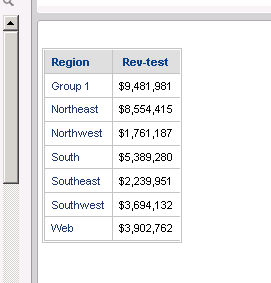
ka04W000000OaS5QAK_0EM4400000025VP.jpeg


KB287134


Comment

0 comments

Details

Knowledge Article

Published:

May 29, 2017

Last Updated:

January 3, 2019