EducationSoftwareStrategy.com
StrategyCommunity

Knowledge Base

Product

Community

Knowledge Base

TopicsBrowse ArticlesDeveloper Zone

Product

Download SoftwareProduct DocumentationSecurity Hub

Education

Tutorial VideosSolution GalleryEducation courses

Community

GuidelinesGrandmastersEvents
x_social-icon_white.svglinkedin_social-icon_white.svg
Strategy logoCommunity

© Strategy Inc. All Rights Reserved.

LegalTerms of UsePrivacy Policy
  1. Home
  2. Topics

KB287153: "Application-defined or object-defined error" error appears when editing document in MicroStrategy Developer 10.x.


Stefan Zepeda

Salesforce Solutions Architect • Strategy


This document shows a known issue where "Application-defined or object-defined error" error appears when editing document in MicroStrategy Developer 10.x. This is because ChartActiveX.ocx was not registered correctly when installing MicroStrategy Developer. The resolution is to unregister and re-register ChartActiveX.ocx.

SUMMARY:
This document shows a known issue where "Application-defined or object-defined error" error appears when editing document in Strategy Developer 10.x. This is because ChartActiveX.ocx was not registered correctly when installing Strategy Developer. The resolution is to unregister and re-register ChartActiveX.ocx.
 
SYMPTOM:
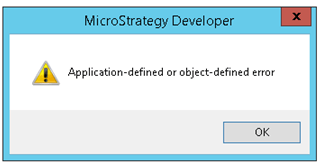
"Application-defined or object-defined error" error appears when editing document in Strategy Developer 10.x as shown below:
ka02R000000kbEBQAY_0EM440000002C26.jpeg


Application-defined or object-defined error

 
This issue most likely occurs in Windows Server 2012 R2, and complete uninstall and resintall of Strategy cannot resolve the issue. Process monitor log indicates Strategy Developer process failed to load file Strategy\Developer\ChartActiveX.ocx as shown below:
 

ka02R000000kbEBQAY_0EM440000002C25.jpeg

However, ChartActiveX.ocx is not under Developer folder. The correct path is Common Files\Strategy\ChartActiveX.ocx. 
 
CAUSE:
One possible cause is ChartActiveX.ocx was not registered correctly when Strategy Developer 10.x was installed. 
 
ACTION:
Follow the tech note below to unregister and re-register ChartActiveX.ocx:
KB11873: How to register and unregister .dll or .ocx (control) files using the RegSvr32 Windows utility


Comment

0 comments

Details

Knowledge Article

Published:

April 10, 2017

Last Updated:

October 12, 2017