SYMPTOM:
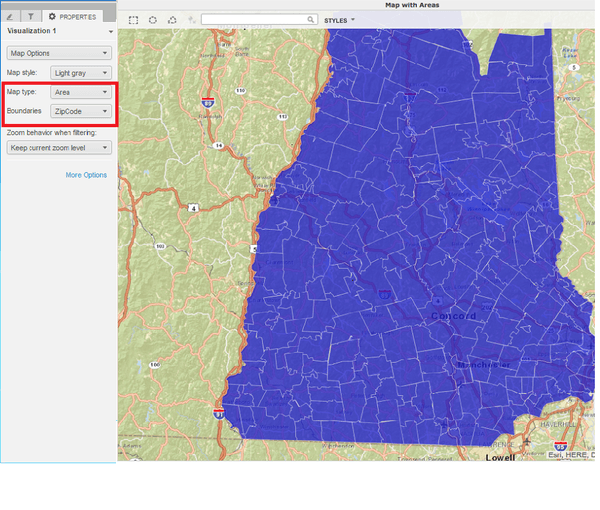
In Strategy Web 10.x, When using a ESRI Map visualization in a Visual Insight Dashboard, users can enable ZIP code area maps as shown below:
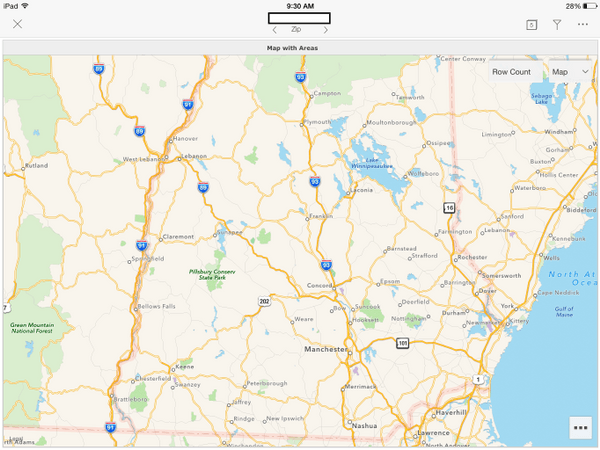
However, Running the same dashboard in Strategy Mobile 10.x Users will not be able to see the zipcode area markers, as shown below:
STEPS TO REPRODUCE:
Follow these steps to reproduce the issue in a Strategy Tutorial Project.
1.Create a VI Dashboard with one zipcode geoattribute and one metric.
2. Change the Visualization to a ESRI Map
3. Go into the properties pane and change the map type to Area and the boundaries to Zipcode.
4. Save the Dashboard.
5. Run it in Strategy Mobile 10.x on an iPad. Notice the zipcode area map markers do not appear.
CAUSE:
An additonal repository is required to use this feature. See the Action section below.
ACTION:
To enable Zip Code area map markers download the following file:
http://mirror.microstrategy.com/software/misc/shapesRepository2.zip
and place it in the following location: StrategyMobile\WEB-INF\xml\maps\shapes and restart the web server.
To enable the zip code area map in Library, place the same file in \StrategyLibrary\WEB-INF\xml\maps\shapes as well. For more information, see KB483324.
KB287290
