EducationSoftwareStrategy.com
StrategyCommunity

Knowledge Base

Product

Community

Knowledge Base

TopicsBrowse ArticlesDeveloper Zone

Product

Download SoftwareProduct DocumentationSecurity Hub

Education

Tutorial VideosSolution GalleryEducation courses

Community

GuidelinesGrandmastersEvents
x_social-icon_white.svglinkedin_social-icon_white.svg
Strategy logoCommunity

© Strategy Inc. All Rights Reserved.

LegalTerms of UsePrivacy Policy
  1. Home
  2. Topics

KB287356: Unchecking 'Set the current prompt answers to be the default prompt answer' does not clear the default prompt answers of a report in MicroStrategy Web 10.2 HF1


Community Admin

• Strategy


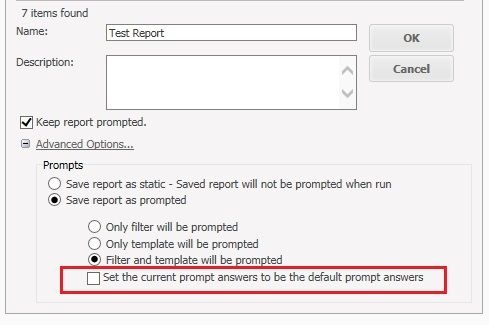
In MicroStrategy Web 10.2 HF1, when a user runs a prompted report, any prompt answer can become the default prompt answer if the report is saved with the option 'Set the current prompt answers to be the default prompt answers' enabled. If a report already contains default prompt answers and the option 'Set the current prompt answers to be the default prompt answer' is unchecked, as shown below and the report is saved, the expectation is that the default prompt answers would be cleared.
SYMPTOM:
In Strategy Web 10.2 HF1, when a user runs a prompted report, any prompt answer can become the default prompt answer if the report is saved with the option 'Set the current prompt answers to be the default prompt answers' enabled. If a report already contains default prompt answers and the option 'Set the current prompt answers to be the default prompt answer' is unchecked, as shown below and the report is saved, the expectation is that the default prompt answers would be cleared.

ka04W000000Ofu7QAC_0EM4400000025Uf.jpeg

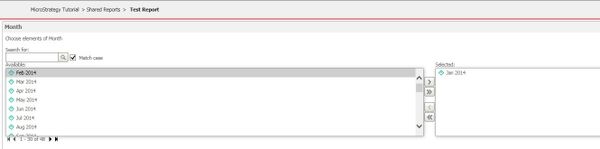
However, the next time the report is run, the previous default prompt answers will persist, as shown below.
ka04W000000Ofu7QAC_0EM4400000025Ud.jpeg

 
STEPS TO REPRODUCE:

  1. Create a new report.
  2. Add an attribute to the grid and to the element prompt filter.
  3. Run the report and add an element to the prompt filter.
  4. Click 'Save As' and do not set the current prompt answer to be default.
  5. Run the newly saved report.
  6. Repeat steps 3 and 4, saving over the old report.
  7. Now when running the report, the prompt answer will be on the right side automatically, despite unchecking the option to save them, which should have cleared them.

 
CAUSE:
This is an identified defect in Strategy Web 10.2 HF 1 that did not occur in 10.2 or earlier.
ACTION:
This issue has been fixed in Strategy Web 10.4 Hotfix 2 and 10.5. Please upgrade to take advantage of the fix.
WORKAROUND:
To clear the default prompt answers, reprompt the report, remove all the answers, run, and save the report keeping the option 'Set the current prompt answers to be the default prompt answers' enabled.
The Strategy Internal Reference Number for the issue discussed in this technical note is DE30097


Comment

0 comments

Details

Knowledge Article

Published:

May 1, 2017

Last Updated:

May 1, 2017