EducationSoftwareStrategy.com
StrategyCommunity

Knowledge Base

Product

Community

Knowledge Base

TopicsBrowse ArticlesDeveloper Zone

Product

Download SoftwareProduct DocumentationSecurity Hub

Education

Tutorial VideosSolution GalleryEducation courses

Community

GuidelinesGrandmastersEvents
x_social-icon_white.svglinkedin_social-icon_white.svg
Strategy logoCommunity

© Strategy Inc. All Rights Reserved.

LegalTerms of UsePrivacy Policy
  1. Home
  2. Topics

KB287410:"The document has been changed. If you do not save it before exporting, your changes will be lost if you refresh it using MicroStrategy Office." error appears when exporting a document from Presentation mode to Excel in MicroStrategy Web 10.0


Community Admin

• Strategy


This Knowledge Base article describes a known issue that "The document has been changed. If you do not save it before exporting, your changes will be lost if you refresh it using MicroStrategy Office." error appears when exporting a document from Presentation mode to Excel in MicroStrategy Web 10.0. This issue has been addressed in MicroStrategy Web 10.3. Upgrade to this version to take advantage of this fix.

SYMPTOM:
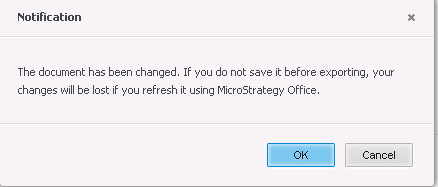
In Strategy Web 10.0, when exporting a Report Service document from Presentation mode to Excel format, a warning message as the one below will pop up, even if no changes have been made to the document. The notification will pop up regardless of weather the user has the "Use Office" privlege or not. 
ka04W000000Ofj2QAC_0EM4400000025P8.jpeg

Message in presentation mode.


The document has been changed. If you do not save it before exporting, your changes will be lost if you refresh it using Strategy Office.

 
STEPS TO REPRODUCE:
Follow the steps below to reproduce this problem in the Strategy Tutorial project:

  1. Login to Strategy Web 10.0.
  2. Create a blank Report Service document by inserting a grid as dataset.
  3. Save the document and display it in Presentation mode.
  4. Export the document to Excel format, a warning message will prompt up for user to save the changes.
  5. This will occur regardless of weather changes were made to the document or not and regardless of weather the user has the "Use Office" privlege.

 
CAUSE:
This is an identified defect in Strategy Web 10.0
 
ACTION:
This issue has been addressed in Strategy Web 10.3. Upgrade to this version to take advantage of this fix.


Comment

0 comments

Details

Knowledge Article

Published:

June 15, 2017

Last Updated:

March 30, 2018