INTRODUCTION:
The Strategy Web 9.x and 10.x application supports Integrated authentication. This means that the Strategy Web application can integrate with Kerberos authentication. This does not mean that Strategy Technical Support supports, or troubleshoots, the setup of Kerberos, or any of it's components. It is mandatory for anyone setting up Kerberos authentication to have a local Kerberos expert/administrator before contacting Strategy Technical Support.
This technical note is meant to break down how Strategy Technical Support approaches Integrated authentication issues that specifically affect the authentication in Strategy Web. The basis of this technical note is to ensure that proper investigation has been done internally before contacting Strategy Technical Support.
KERBEROS:
Kerberos is one of the most complicated authentication and authorization systems to implement and maintain, and troubleshooting Kerberos effectively requires not only Kerberos knowledge, but in-depth knowledge of the environment and servers. Kerberos is not a Strategy product, and Strategy Web is not a application server, it is just an application. For this reason, Strategy Web does not interact directly with Kerberos components. Rather, Kerberos interacts with the application server, Microsoft IIS, Apache Tomcat, etc., and the Java Virtual Machine, which is also third-party. When these interactions fail, the end result on the Strategy Web side is always the same error message, regardless of the cause of the problem. The Strategy application has not further way of knowing the cause of the problem, therefore, Kerberos issues are largely out of scope for Strategy Technical Support.
Strategy Web:
To expand on the above, Strategy Web has two settings that are needed to use Integrated (Kerberos) authentication:
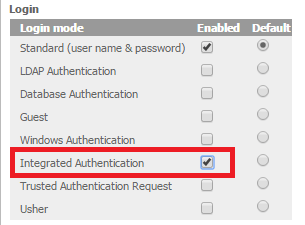
The reason for the distinction between Integrated and Kerberos is that Strategy Web does not actually perform any Kerberos operations, nor does Strategy Web have any backend code that directly interfaces with Kerberos functions. What Strategy Web is capable of, is taking credentials already decrypted by the application server itself and sending those credentials to the Strategy Intelligence Server. At no point does Strategy Web interact with any Kerberos material. This is why the only error users will receive is:
"Error in login: No valid credentials provided"
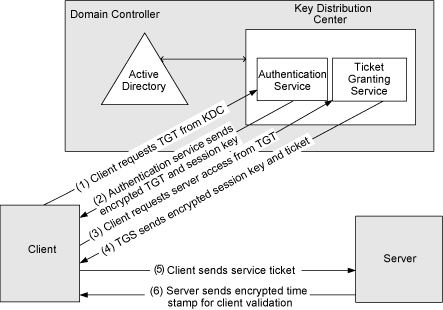
Strategy Web gets involved in the process after Step 5. Drilling down into the Server, it is now clear what pertains to the web application server and to the Strategy Web application:
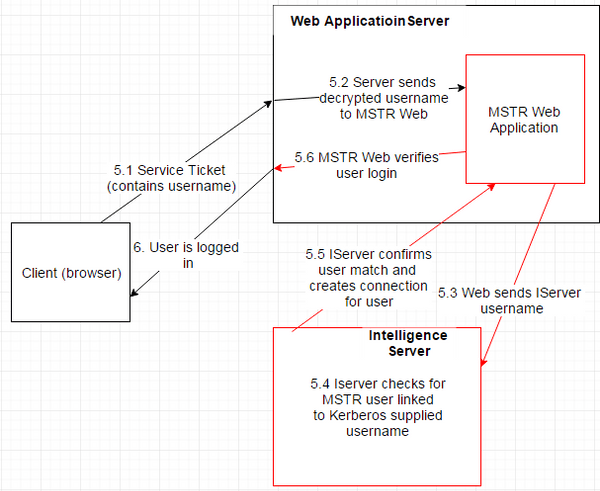
5.1 The Client sends the service ticket that contains the username to the application server.
5.2 The application server decrypts the username and sends it to the Strategy Web application.
5.3 The Strategy Web application now needs to send the decrypted username to the Strategy Intelligence Server. At this point, the application server needs to send this to the Strategy Intelligence Server, still through Kerberos protocols. This means, the application server now becomes the "Client" and the Strategy Intelligence Server becomes the "Server". The Kerberos process starts all over again from steps 1 through 5.
5.4 If the process successfully gets to step 5 the second time, the Strategy Intelligence Server will compare the username provided by Strategy Web against the user repository in the Strategy MD. If a user is found that matches that username, the authentication will succeed, else it will fail.
5.5 The Strategy Intelligence Server replies to the authentication request sent by Strategy Web still through Kerberos protocols.
5.6 Strategy Web generates a response based on the results to the authenticaiton, that the application server will send to the Client, still through Kerberos protocols.
6. The Client recives either, the error message, or access to the Strategy Project.
The red lines indicate the steps where Strategy Web becomes involved in typical client authentication request with Kerberos. By the time Strategy Web becomes involved, the ticket has already been decrypted by the application server, and all Strategy Web must do to complete the process is send the decrypted username to the Strategy Intelligence Server, which will check if any Strategy user has the specified NT ID linked to their user account.
In the example above, the Intelligence Server found a match. If it does not find a match for any reason, Strategy Web will display the "No Valid Credentials" error.
CONCLUSION:
With the above known, the root of all kerberos authentication issues lies on Strategy Web not receiving a valid username that matches a user in the Strategy MD. Thus only one error message exists and no access to further troubleshoot the real cause of the credentials being invalid.
The bulk of all Kerberos configuration is done exclusively on the application server settings and Active Directory settings. This also means that in practice, the issue is almost always caused by a misconfiguration on the application server side, or a change in one of the many moving parts that allows Kerberos to function that was not mirrored on the web application server machine. Such settings include the KVNO, ticket times, the krb5.conf and jaas.conf files, ticket and key encryption, and so on.
CONTACTING Strategy TECHNICAL SUPPORT:
Before contacting Strategy Technical Support, the following general questions should have sufficient answers:
Having satisfactory answers to the above ensures that any Kerberos issue that arises has been satisfactorily investigated internally, where the teams that built the environment investigate first, as they would have not only the Kerberos expertise needed for troubleshooting, but the deep knowledge of the environment. Fewer than 1% of all Kerberos cases logged with Strategy Technical Support have been caused by Strategy Web settings, so it is imperative that this internal investigation takes places before contacting Technical Support.
THIRD PARTY SOFTWARE INSTALLATION WARNING:
The third-party product(s) discussed in this technical note is manufactured by vendors independent of Strategy. Strategy makes no warranty, express, implied or otherwise, regarding this product, including its performance or reliability.
KB287591
