EducationSoftwareStrategy.com
StrategyCommunity

Knowledge Base

Product

Community

Knowledge Base

TopicsBrowse ArticlesDeveloper Zone

Product

Download SoftwareProduct DocumentationSecurity Hub

Education

Tutorial VideosSolution GalleryEducation courses

Community

GuidelinesGrandmastersEvents
x_social-icon_white.svglinkedin_social-icon_white.svg
Strategy logoCommunity

© Strategy Inc. All Rights Reserved.

LegalTerms of UsePrivacy Policy
  1. Home
  2. Topics

KB287605: The “Loading Data…” notification does not go away after exporting a document from Presentation mode in MicroStrategy Web 10.0 - 10.3.


Community Admin

• Strategy


The “Loading Data…” notification does not go away after exporting a document from Presentation mode in MicroStrategy Web 10.0 - 10.3.

SYMPTOM:
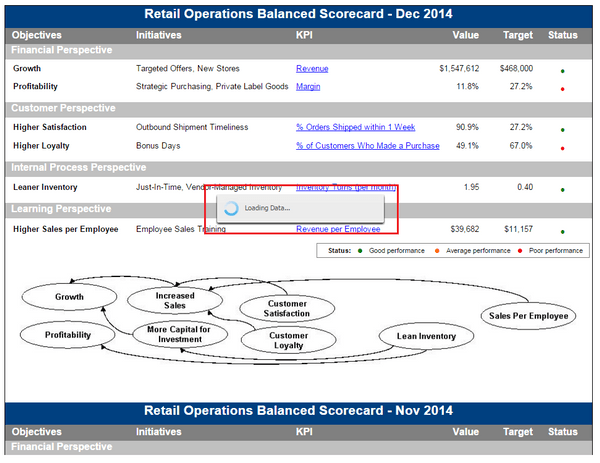
In Strategy Web 10, there is a preference under Project Defaults > General > Output Formats: “Re-use new window for each export, print, PDF action” that allows users to use a single window for consecutive exports. When this setting is enabled, the “Loading Data…” notification appears when exporting documents from Presentation mode, as seen below, and never goes away. 
ka04W000000ObbJQAS_0EM4400000025UL.jpeg

However, the document is successfully exported.  This issue occurs for all exports from Presentation mode and does not occur in other modes. 
 
STEPS TO REPRODUCE:
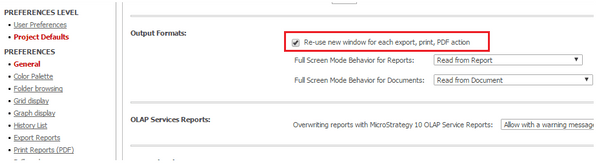
  • Access the Strategy Web 10 Project Default preferences and navigate to: General > Output Formats.
  • Enable the "Re-use new window for each export, print, PDF action" shown below.
ka04W000000ObbJQAS_0EM4400000025UN.jpeg
  • Apply the changes.
  • Execute a document from Strategy Web 10.
  • Export the document to PDF.
  • Notice the Load Data... window does not go away, but the document exports properly.

 
CAUSE:
This is an identified defect in Strategy Web 10.0 - 10.3.
 
ACTION:
This issue has been addressed in Strategy Web 10.4. Upgrade to this version to take advantage of this fix.
 
WORKAROUND:
If possible, disable the “Re-use new window for each export, print, PDF action” setting in the Strategy Web 10 Preferences.


Comment

0 comments

Details

Knowledge Article

Published:

May 30, 2017

Last Updated:

May 30, 2017