SYMPTOM:
Visual Insight dashboards can be converted to documents in Strategy Web 10. Unlike Visual Insight dashboards, Report Services Documents can be edited in Strategy Web as well as Strategy Developer. However when Visual Insight dashboards are converted to RS documents through Strategy Web, the edit option for the RS document is grayed out in Strategy Developer, as seen below.
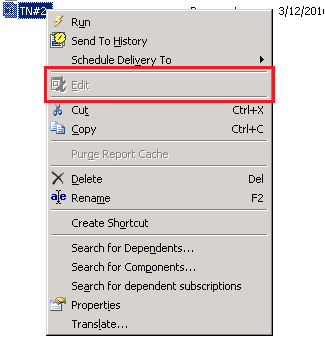
This prevents the document from being edited from Strategy Developer.
STEPS TO REPRODUCE:
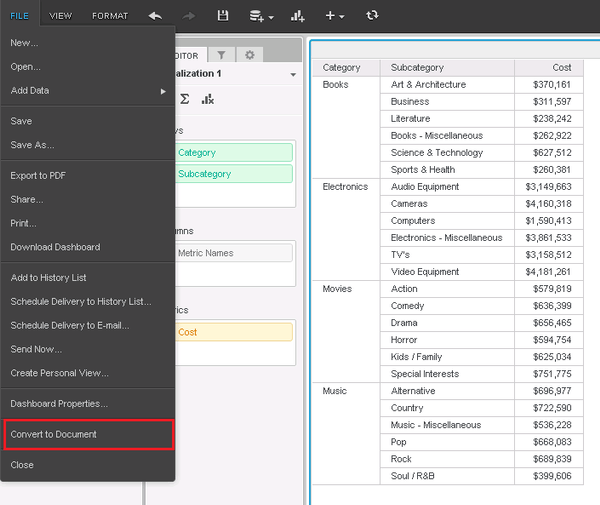
CAUSE:
This is by design for Strategy Developer 10.0-10.5. After converting a Visual Insight dashboard to a Report Services Document, the document will only be editable through Strategy Web.
ACTION:
The ability to edit documents converted from a Visual Insight Dashboard within Strategy Developer has been added in Strategy Developer 10.6. Upgrade to this version to take advantage of the new feature.
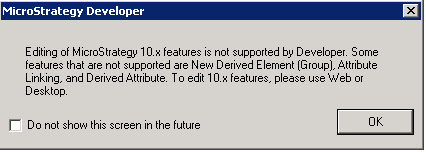
NOTE: Some Strategy 10.x features are still only configurable through Strategy Web. Although you can now edit and save documents with these features in Developer, the editing of those particular features will be disabled in Developer.
WORKAROUND:
After converting the Visual Insight dashboard to a document, edit the document in Strategy Web rather than in Strategy Developer.
The Strategy Internal Reference Number for the issue discussed in this technical note is DE28429.
