EducationSoftwareStrategy.com
StrategyCommunity

Knowledge Base

Product

Community

Knowledge Base

TopicsBrowse ArticlesDeveloper Zone

Product

Download SoftwareProduct DocumentationSecurity Hub

Education

Tutorial VideosSolution GalleryEducation courses

Community

GuidelinesGrandmastersEvents
x_social-icon_white.svglinkedin_social-icon_white.svg
Strategy logoCommunity

© Strategy Inc. All Rights Reserved.

LegalTerms of UsePrivacy Policy
  1. Home
  2. Topics

KB287663: Connecting to Salesforce.com with TLS 1.1 or TLS 1.2 encryption protocol using the MicroStrategy ODBC Driver for Salesforce


Community Admin

• Strategy


When connecting to SalesForce.com in MicroStrategy Secure Enterprise 10.x following error may be seen: UNSUPPORTED_CLIENT: TLS 1.0 has been disabled in this organization. Please use TLS 1.1 or higher when connecting to Salesforce using https. Connection String: DSN=xxxx......

SYMPTOM:
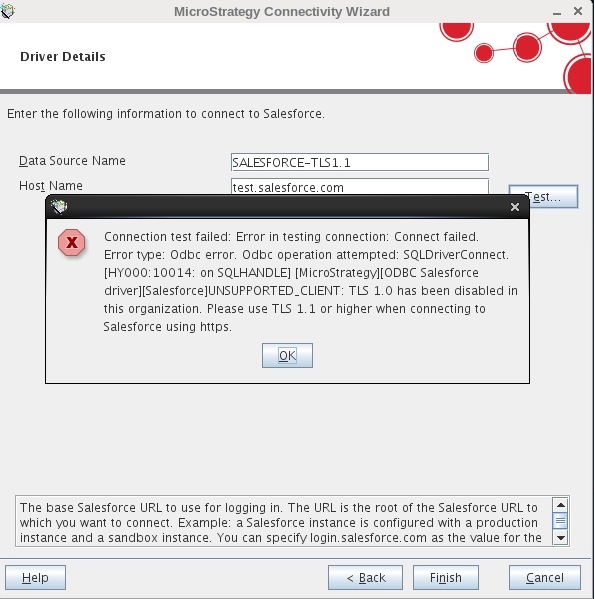
When connecting to SalesForce.com in Strategy Secure Enterprise 10.x following error may be seen:


ka04W000000Oak9QAC_0EM440000002JA8.jpeg


UNSUPPORTED_CLIENT: TLS 1.0 has been disabled in this organization.  Please use TLS 1.1 or higher when connecting to Salesforce using https. Connection String: DSN=xxxx......

 
CAUSE:
Salesforce.com will no longer support connections using TLS 1.0 as of June 2016 (https://help.salesforce.com/apex/HTViewSolution?id=000221207).
 
The Strategy ODBC Driver for Salesforce uses the Java 7 JRE (1.7) which by default uses TLS 1.0.
 
ACTION:
In order to enable Salesforce.com connection in Strategy Secure Enterprise 10.1, 10.2 and 10.3 the JVM Arguments will need to be modified to add the following:
 

-Dhttps.protocols=TLSv1.1,TLSv1.2

 
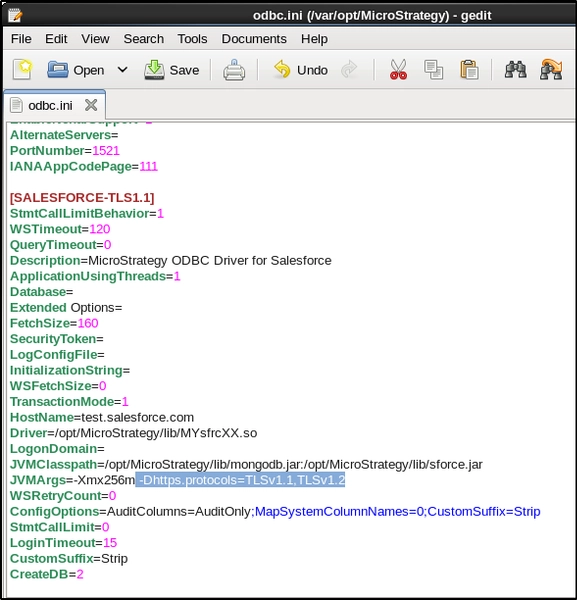
On Linux this is done by editing the odbc.ini file and adding the argument after the default "–Xmx256m" in the “JVMArgs” parameter:


ka04W000000Oak9QAC_0EM440000002JAA.jpeg

The modified line will read:


JVMArgs=-Xmx256m -Dhttps.protocols=TLSv1.1,TLSv1.2
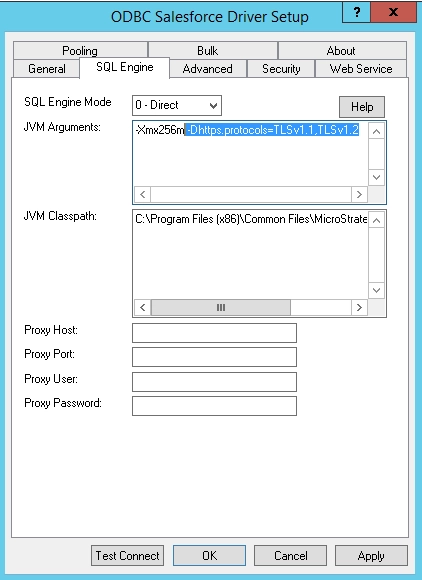
 
 On Windows this can be changed in the ODBC Driver setup as shown below:
 

ka04W000000Oak9QAC_0EM440000002JAC.jpeg


Note
Some users may experience the following error when connecting to Salesforce with the Strategy ODBC Driver for Salesforce after the addition of TLS 1.1 support: "The configuration options used to open the database do not match the options used to create the database." Please refer to the following Strategy Tech Note to resolve this issue: KB42520
 
KB287663


Comment

0 comments

Details

Knowledge Article

Published:

June 2, 2017

Last Updated:

December 31, 2018