EducationSoftwareStrategy.com
StrategyCommunity

Knowledge Base

Product

Community

Knowledge Base

TopicsBrowse ArticlesDeveloper Zone

Product

Download SoftwareProduct DocumentationSecurity Hub

Education

Tutorial VideosSolution GalleryEducation courses

Community

GuidelinesGrandmastersEvents
x_social-icon_white.svglinkedin_social-icon_white.svg
Strategy logoCommunity

© Strategy Inc. All Rights Reserved.

LegalTerms of UsePrivacy Policy
  1. Home
  2. Topics

KB287900: Where are the Apache Tomcat Administrator and MySQL Metadata passwords located when using the Express Installation?


Community Admin

• Strategy


After completing the Express Installation of MicroStrategy, administrators notice that Apache Tomcat was automatically installed, instead of Microsoft IIS, and that the MicroStrategy Tutorial MD was deployed on MySQL, instead of Access.

SYMPTOM:
After completing the Express Installation of Strategy 10.3, administrators notice that Apache Tomcat was automatically installed, instead of Microsoft IIS, and that the Strategy Tutorial MD was deployed on MySQL, instead of Access.
Note: For more information on Tomcat vs IIS installation, refer to tech note KB287631.
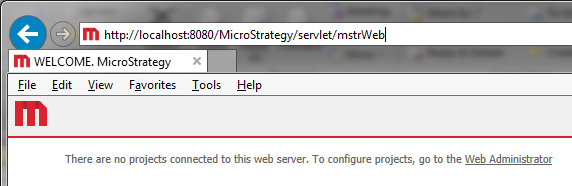
When accessing Strategy Web 10.3 through this setup of Tomcat, the users will see no projects connected, and a request to connect to a Strategy Intelligence Server, as shown below:
ka04W00000148qgQAA_0EM4400000025Vd.jpeg


There are no projects connected to this web server. To configure projects, go to the Web Administrator
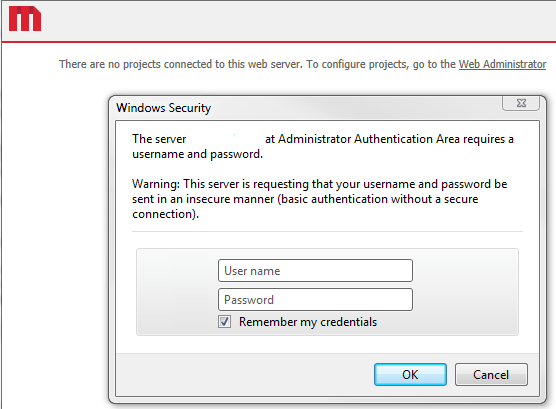
 
To add projects, the user must go into the Strategy Web 10.3 Admin page. However, when accessing the Admin page, users are prompted for credentials and no credentials seem to work, as shown below:

ka04W00000148qgQAA_0EM4400000025VY.jpeg


The server <machine name> at Administrator Authentication Area requires a username and password.

 
CAUSE:
The security of the Strategy Web Admin page is not handled directly by Strategy. It is delegated to the application server. This is regardless of the version of Strategy Web and of the application server. In this case, Apache Tomcat is the one requesting the authentication credentials, thus no Strategy credentials will work here.
 
ACTION:
Both, the Tomcat administrator user and the MySQL MD password is automatically generated during the express installation.  The same password applies to both and is then placed in a text file called "express_password", located in under:

Common Files\Strategy

Note: The username for both administrator accounts is "mstr".


Comment

0 comments

Details

Knowledge Article

Published:

March 31, 2017

Last Updated:

March 31, 2017