EducationSoftwareStrategy.com
StrategyCommunity

Knowledge Base

Product

Community

Knowledge Base

TopicsBrowse ArticlesDeveloper Zone

Product

Download SoftwareProduct DocumentationSecurity Hub

Education

Tutorial VideosSolution GalleryEducation courses

Community

GuidelinesGrandmastersEvents
x_social-icon_white.svglinkedin_social-icon_white.svg
Strategy logoCommunity

© Strategy Inc. All Rights Reserved.

LegalTerms of UsePrivacy Policy
  1. Home
  2. Topics

KB287911: How to find the build number related to MicroStrategy Mobile 10.x.


Community Admin

• Strategy


This article this the steps to find the MicroStrategy build number for the Out-of-the-box (OOTB) mobile application, rebranded application, and MicroStrategy Mobile and Intelligence Servers.

SYMPTOM:
In many cases, Strategy Technical Support may require to verify the version of the Strategy Mobile application being used in order to accurately setup a testing environment in-house. In order to provide this information, the build number of the Strategy Mobile application should be provided along with the version of the Strategy servers installed.
 
ACTION:
Follow these steps to find the build number of the Strategy Mobile 10.x:

  1. Out-of-the-box (OOTB) application.
  2. Rebranded application.
  3. Strategy Mobile and Intelligence Servers.


1. For the out-of-the-box (OOTB) application.
This is the application downloaded from the Apple appstore.
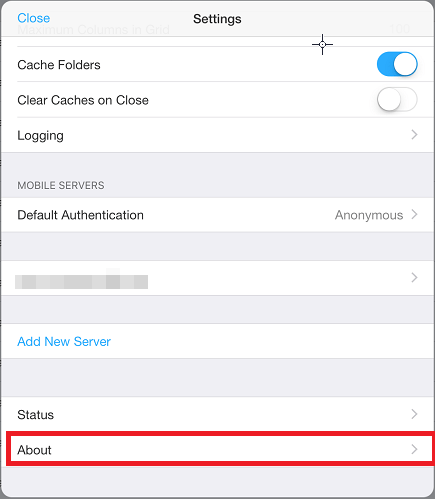
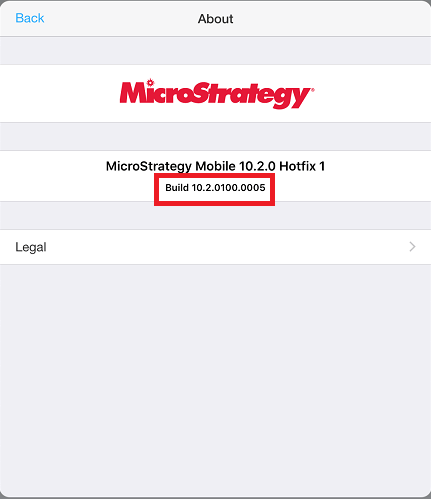
  • Open the Strategy Mobile 10.x app.
  • Go to Settings > About:
ka04W000000Oe1nQAC_0EM4400000029te.jpeg
  • Take a screenshot of the page displayed below: 

ka04W000000Oe1nQAC_0EM4400000029tk.jpeg
  • Provide the screenshot to Strategy Technical Support.

 
2. For the rebranded application.
When using a rebranded app, very often the build number will not be displayed in the About section in the app settings. If this is the case, the build number is listed as the "bundle version" in XCode, as shown below:

ka04W000000Oe1nQAC_0EM4400000029tS.jpeg

 
Provide this information to Strategy Technical Support.
 
3. For the Strategy Mobile and Intelligence Servers
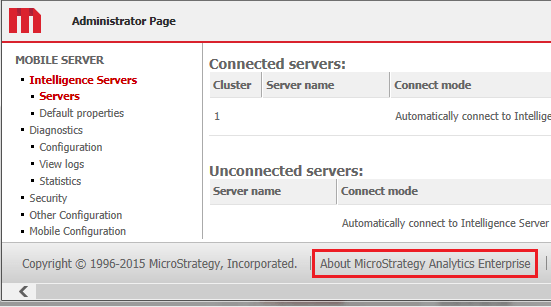
  • The Strategy Mobile server build number can be located in the Strategy Mobile Admin page > About, as shown below:
     
ka04W000000Oe1nQAC_0EM4400000029tU.jpeg
  • Take a screenshot of the page below:
     
ka04W000000Oe1nQAC_0EM4400000029ti.jpeg
  • Send the screenshot with the build numbers to Strategy Technical Support.

Comment

0 comments

Details

Knowledge Article

Published:

April 4, 2017

Last Updated:

April 4, 2017