EducationSoftwareStrategy.com
StrategyCommunity

Knowledge Base

Product

Community

Knowledge Base

TopicsBrowse ArticlesDeveloper Zone

Product

Download SoftwareProduct DocumentationSecurity Hub

Education

Tutorial VideosSolution GalleryEducation courses

Community

GuidelinesGrandmastersEvents
x_social-icon_white.svglinkedin_social-icon_white.svg
Strategy logoCommunity

© Strategy Inc. All Rights Reserved.

LegalTerms of UsePrivacy Policy
  1. Home
  2. Topics

KB287992: Error "the folder name is unknown to the server" appears in object window when creating new report and browsing to “System prompts” in MicroStrategy Web 10.2.


Community Admin

• Strategy


SYMPTOM:
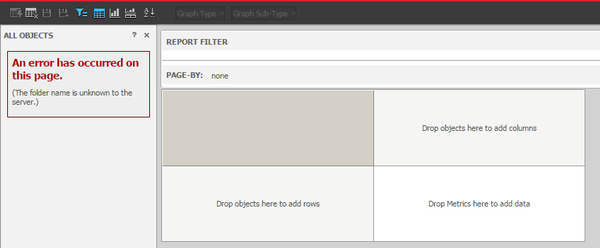
Error "the folder name is unknown to the server" appears in object window when creating new report and browsing to “System prompts” in Strategy Web 10.2, as below:
ka04W000000OanrQAC_0EM440000002V7I.jpeg

Follow the steps below to reproduce the issue:

  1. In Strategy Web, create a new blank report.
  2. In object window, navigate to Public objects-Prompts. Click on "System prompts" folder. The error "the folder name is unknown to the server" appears.

.CAUSE:
This is a known issue with Strategy Web 10.2.
ACTION:
This issue has been addressed in MicroStrateg 10.4 or above, where 'system prompt' folder is not exposed in Web to end user. Because system prompts are used in filters and metric expressions and it cannot be directly added to a report. 
The Strategy Internal Reference Number for the issue discussed in this technical note is DE27614
KB287992


Comment

0 comments

Details

Knowledge Article

Published:

July 12, 2017

Last Updated:

August 22, 2018