EducationSoftwareStrategy.com
StrategyCommunity

Knowledge Base

Product

Community

Knowledge Base

TopicsBrowse ArticlesDeveloper Zone

Product

Download SoftwareProduct DocumentationSecurity Hub

Education

Tutorial VideosSolution GalleryEducation courses

Community

GuidelinesGrandmastersEvents
x_social-icon_white.svglinkedin_social-icon_white.svg
Strategy logoCommunity

© Strategy Inc. All Rights Reserved.

LegalTerms of UsePrivacy Policy
  1. Home
  2. Topics

KB288060: Microstrategy Developer does not accept characters in the Subscription name that Web does in MicroStrategy 10.x.


Stefan Zepeda

Salesforce Solutions Architect • Strategy


In Microstrategy Web User can insert special characters: “ \ [ ] into Subscription name, but in Developer those characters are not acceptable.

SYMPTOM:
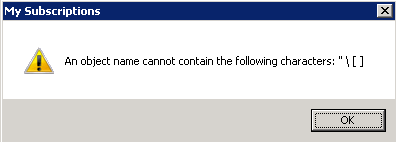
In Strategy Web User can insert special characters: “ \ [ ] into Subscription name, but in Developer those characters are not acceptable. While changing the Subscription name in Developer, User receives an error message as shown below:
ka02R000000kbKVQAY_0EM440000002HER.jpeg

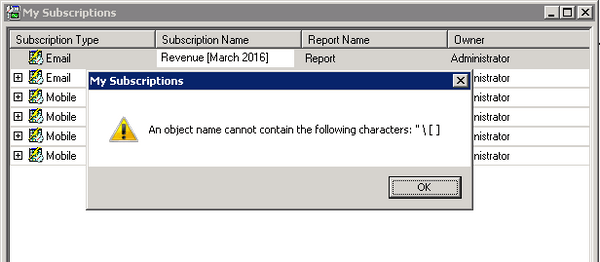
An object name cannot contain the following characters: " \ [ ]
 
STEPS TO REPRODUCE:
1. In Strategy Web 10.x open a Report and create Subscription including special characters i.e. " \ [ ] in the name as shown below:

ka02R000000kbKVQAY_0EM440000002HEK.jpeg

2. In Strategy Developer go to Tools -> My Subscriptions and rename newly created Subscription leaving special characters.
3. With attempt of saving new subscription name, error message displays as shwon below:
ka02R000000kbKVQAY_0EM440000002HEJ.jpeg

 
CAUSE:
This is a limitation of Strategy Developer.
ACTION:
Strategy will continue to investigate and post updates as soon as they are available.
WORKAROUND:
Use Web to change Subscription names that include special characters.


Comment

0 comments

Details

Knowledge Article

Published:

April 17, 2017

Last Updated:

July 17, 2017