EducationSoftwareStrategy.com
StrategyCommunity

Knowledge Base

Product

Community

Knowledge Base

TopicsBrowse ArticlesDeveloper Zone

Product

Download SoftwareProduct DocumentationSecurity Hub

Education

Tutorial VideosSolution GalleryEducation courses

Community

GuidelinesGrandmastersEvents
x_social-icon_white.svglinkedin_social-icon_white.svg
Strategy logoCommunity

© Strategy Inc. All Rights Reserved.

LegalTerms of UsePrivacy Policy
  1. Home
  2. Topics

KB288415: HTML tags in Object descriptions displayed in Object Browser tooltips render as clear text in MicroStrategy Web 10.x


Community Admin

• Strategy


In MicroStrategy Web 10.x, users can add descriptions to MD objects that will appear in tooltips. However, in the Object Browser window, the HTML output does not render and displays the HTML tags in clear text in the tooltips

SYMPTOM:
In Strategy Web 10.x, users can add descriptions to MD objects that will appear in tooltips, as shown below.
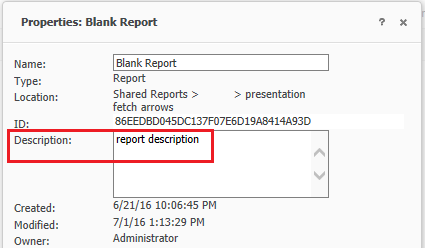
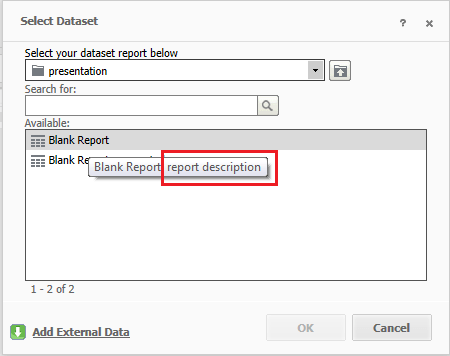
ka04W000000OftlQAC_0EM4400000025Tu.jpeg
ka04W000000OftlQAC_0EM4400000025Tw.jpeg

If in the Strategy Web 10 Admin page > Security > User Input Filtering, the user enables "Allow HTML output in Object Description", this will allow HTML tags within object descriptions to render HTML formating tags as shown below.

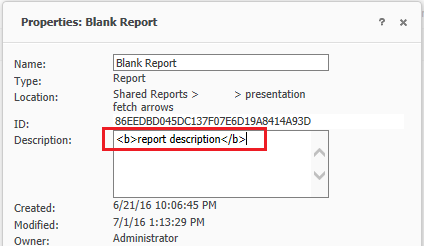
ka04W000000OftlQAC_0EM4400000025Tr.jpeg
ka04W000000OftlQAC_0EM4400000025U4.jpeg
ka04W000000OftlQAC_0EM4400000025Tt.jpeg

However, in the Object Browser window, the HTML output does not render and displays the HTML tags in clear text in the tooltips, as shown below.

ka04W000000OftlQAC_0EM4400000025Ts.jpeg
ka04W000000OftlQAC_0EM4400000025U2.jpeg

 
STEPS TO REPRODUCE:

  1. Navigate to a report object.
  2. Right click on it and select > Properties.
  3. In the description add:
    
    <b>This is bold</b>

  4. In the Strategy Web Admin page > Security > User Input Filtering, enable "Allow HTML output in Object Description."
  5. Create a new document.
  6. In the object browser, navigate to the report whose properties were modified.
  7. Hover over the report and notice that in the tooltip the HTML tags are displayed instead of rendering the correct formatting.

CAUSE:
This is working as designed in Strategy Web 10. For the object browser Strategy Web 10 delegates the rendering of tooltips to the browser's native tooltip which does not support HTML on it. 
ACTION:
This issue was reviewed by our Technology team for feasibility and will not be scoped for a code fix in any upcoming Strategy release.


Comment

0 comments

Details

Knowledge Article

Published:

June 12, 2017

Last Updated:

June 12, 2017
