EducationSoftwareStrategy.com
StrategyCommunity

Knowledge Base

Product

Community

Knowledge Base

TopicsBrowse ArticlesDeveloper Zone

Product

Download SoftwareProduct DocumentationSecurity Hub

Education

Tutorial VideosSolution GalleryEducation courses

Community

GuidelinesGrandmastersEvents
x_social-icon_white.svglinkedin_social-icon_white.svg
Strategy logoCommunity

© Strategy Inc. All Rights Reserved.

LegalTerms of UsePrivacy Policy
  1. Home
  2. Topics

KB288935: "Create New Report" and "Browse All Objects" not shown in Visual Insight using MicroStrategy 10.x


Community Admin

• Strategy


SUMMARY
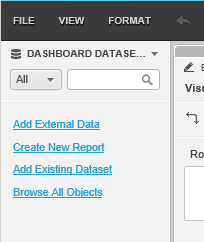
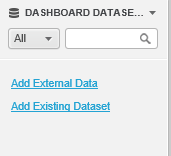
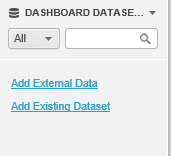
Using Visual Insight in Strategy 10.x, the options "Create New Report" and "Browse All Objects" when creating new Dashboard or editing an existing one.
ka04W000000ObvXQAS_0EM440000002V78.jpeg

 
STEPS TO REPRODUCE

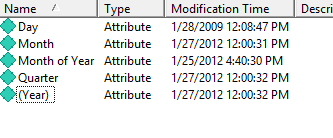
  • In Strategy Tutorial, change name of Attribute ‘Year’ to ‘(Year)’
ka04W000000ObvXQAS_0EM440000002V7C.jpeg
  • Update Schema
ka04W000000ObvXQAS_0EM440000002V76.jpeg
  • Purge Strategy Web caches by launching following URL: http://localhost/MicroStrategy/asp/Admin.aspx?pg=purgecaches
     
  • Open Strategy Web and the issue is not present:
ka04W000000ObvXQAS_0EM440000002V77.jpeg
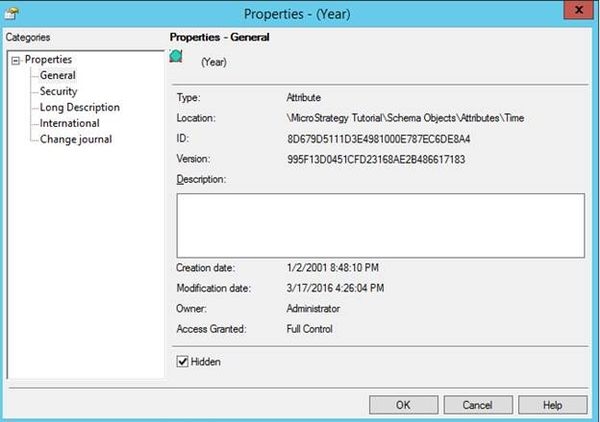
  • Change the Attribute to be hidden:
ka04W000000ObvXQAS_0EM440000002V75.jpeg
  • Purge the Web caches again as in step 3.
     
  • Login to Strategy Web
     
  • Create a new VI dashboard and notice that the two properties are missing:
ka04W000000ObvXQAS_0EM440000002V7B.jpeg

 
CAUSE
This is a known issue in Strategy Web. "Create New Report" and "Browse All Objects" only appears if attributes are available in the project schema. For this check an attribute search is performed. Due to this defect "Create New Report" and "Browse All Objects" will not be shown if the first attribute returned in the attribute search is hidden. Attribute names beginning with special characters - such as * : [ ] ( ) - are returned at the top of the search results and if the attribute is hidden Visual Insight will not be showing the options "Create New Report" and "Browse All Objects".
ACTION
This issue is resolved in 10.4 Hotfix 1 and 10.5. Upgrade to either of these versions to take advantage of the fix. 
 
WORKAROUND
1. Remove the special characters - such as * : [ ] ( ) - from the attribute name or
2. Make the first attribute is visible by unchecking the hidden property
KB288935


Comment

0 comments

Details

Knowledge Article

Published:

July 12, 2017

Last Updated:

February 7, 2018