If the Linux system entropy pool becomes depleted, SSL operations can become very slow. In some Linux environments, Strategy users have reported slow ODBC connection times when attempting to use SSL encryption on the Strategy ODBC Drivers. If SSL encryption is disabled in the DSN, the connection to the database is noticeably faster.
When supported by the ODBC Driver, SSL encryption is enabled by adding the following parameter in the DSN in the Strategy odbc.ini:
EncryptionMethod=1
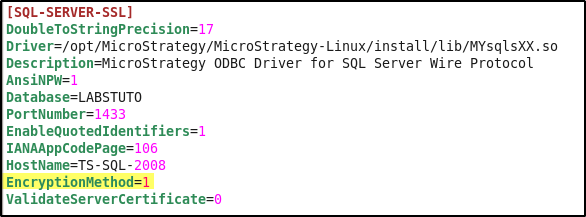
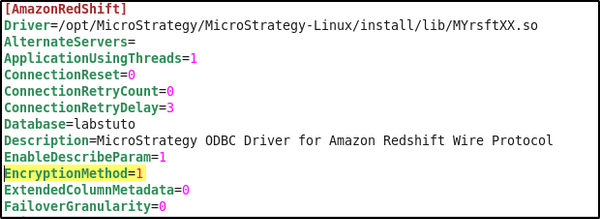
Progress DataDirect, the creator of the ODBC drivers packaged with Strategy, provides the following tech note describing the issue: http://knowledgebase.progress.com/articles/Article/000044058.
While the Progress tech note only refers to the SQL Server Wire Protocol driver, the same slow connection time can also be observed with other Strategy ODBC Drivers when SSL encryption is enabled.
This issue is caused by the Linux system entropy pool becoming depleted, causing slow read times from the /dev/random file. SSL connections use random numbers to calculate the hash functions for encryption, so a steady supply of entropy is needed on the system for SSL connections to be established in a timely manner.
In order to resolve the slow ODBC connection issue with SSL encryption enabled, a Linux administrator must update the Linux system to increase entropy in the /dev/random file. After making this change, the ODBC connections with SSL enabled (EncryptionMethod=1) should be noticeably faster.
The following commands could be run in the Linux OS by a user with appropriate privileges to supply the entropy pool with values from /dev/urandom:
rngd -r /dev/urandom
ln -sf /dev/urandom /dev/random
WARNING
The third-party product(s) discussed in this technical note is manufactured by vendors independent of Strategy. Strategy makes no warranty, express, implied or otherwise, regarding this product, including its performance or reliability.
