EducationSoftwareStrategy.com
StrategyCommunity

Knowledge Base

Product

Community

Knowledge Base

TopicsBrowse ArticlesDeveloper Zone

Product

Download SoftwareProduct DocumentationSecurity Hub

Education

Tutorial VideosSolution GalleryEducation courses

Community

GuidelinesGrandmastersEvents
x_social-icon_white.svglinkedin_social-icon_white.svg
Strategy logoCommunity

© Strategy Inc. All Rights Reserved.

LegalTerms of UsePrivacy Policy
  1. Home
  2. Topics

KB289422: The LOAD/UNLOAD button is greyed out in Developer if an IP address is used in the Project Source Manager in MicroStrategy 10.2


Stefan Zepeda

Salesforce Solutions Architect • Strategy


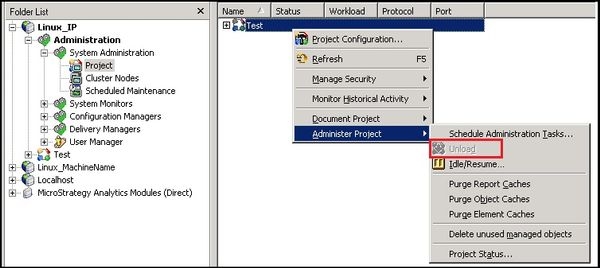
The LOAD/UNLOAD button may get greyed out if an IP address is specified in the Project Source Manager. This issue is sometimes seen when the Intelligence Server to which Developer connects is on a Linux machine. This is classified as a defect, and the workaround is to use the corresponding machine name instead.

SYMPTOM:
The LOAD/UNLOAD button may get greyed out if an IP address is specified in the Project Source Manager. This issue is sometimes seen when the Intelligence Server to which Developer connects is on a Linux machine. This is classified as a defect, and the workaround is to use the corresponding machine name instead.
 
STEPS TO REPRODUCE
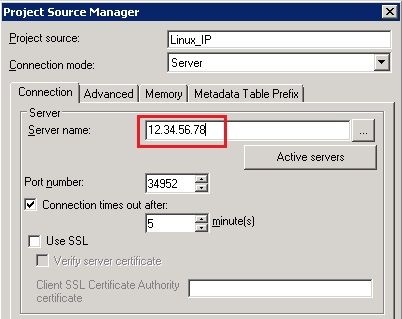
  1. In the Project Source Manager, specify the server by typing the IP address as follows


ka02R000000kazBQAQ_0EM440000002HEM.jpeg
  1. Go to System Administration -> Project, and notice that the UNLOAD button is greyed out
ka02R000000kazBQAQ_0EM440000002HEF.jpeg

 
CAUSE:
This is a known issue with Strategy 10.2
 
ACTION:
This issue has been addressed in Strategy Secure Enterprise 10.4. Please upgrade to this version to take advantage of a fix of this issue.
 
WORKAROUND:
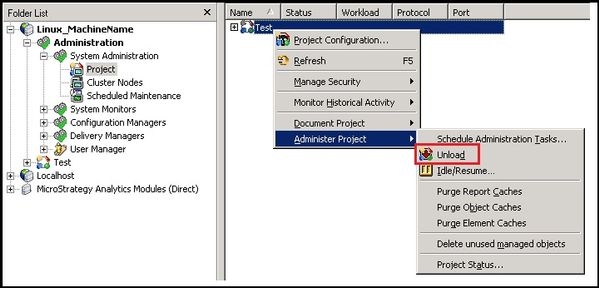
Instead of the IP address, use the machine name as follows
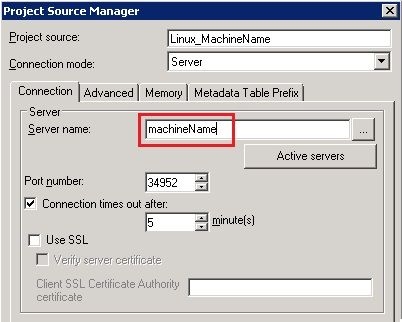
ka02R000000kazBQAQ_0EM440000002HEL.jpeg
ka02R000000kazBQAQ_0EM440000002HEG.jpeg

Article reference:    KB289422


Comment

0 comments

Details

Knowledge Article

Published:

April 17, 2017

Last Updated:

January 21, 2019