SYNOPSIS:
This Technical Note describes a defect on Strategy 9.4.1 where the Edit Links functionality in Web when answering prompts dynamically from a source document to a target document is not working properly in Flash mode but is working as expected in Editable, Express and Interactive modes.
SYMPTOM:
In Strategy Web 9.4.1 Value prompt are not answered correctly from source document to target document when using "Edit Links" functionality with "Answer Dynamically" option enabled in Flash.
STEPS TO REPRODUCE:
1) Create a Report in Strategy Web using Strategy Tutorial Project with the Attribute Category and metric Revenue. Save and close the report and name the report as "Source_Report".
2) Copy and paste the "Source_Report" and renamed as "Tearget_Report".
3) Edit the "Target_Report" > Insert the Category attribute to the filter and click on "Create Value Prompt" option > Apply >Save and Close.
4) Create a new document and insert the report "Source_Report" as dataset > Create a grid with the attribute Category and the metric Revenue > Save and Close (name the document as "Source_Doc")
5) Right mouse click on the "Source_Doc" > Copy and paste the document and rename as "Target_Doc".
6) Edit the "Target_Doc" > Right mouse click on the "Source_Report" dataset > Replace dataset > navigate to the "Target_Report" and select this report.
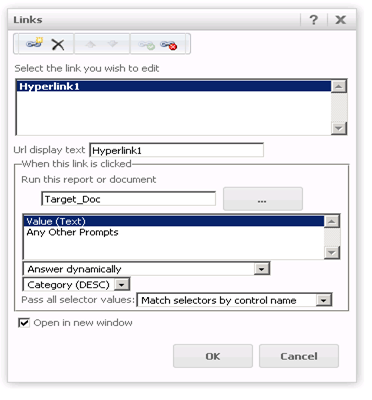
7) Run the "Source_Doc" in Editable mode > Right mouse click on the Category header > Edit Links > Select the "Target_Doc" as target > Select "Answer Dynamically" option (see image and select the same options) and save and close the document.
8) Open the "Source_Doc" in Editable mode > Click on one of the attribute elements (for example Books) and "Target_Doc" will opens in a new window with the Value prompt answered correctly. (see image)
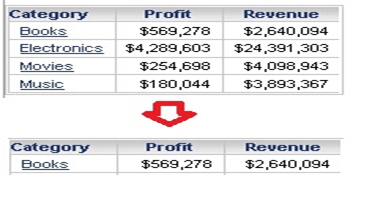
9) Run the "Source_Doc" in Flash mode, select one of the attribute elements (for example Books) and the "Target_Report" will open with the Value prompt not answered dynamically (see image)

CAUSE:
This is a known issue in Strategy 9.4.1.
ACTION:
This issue has been fixed in Strategy 10. Upgrade to this version to take advantage of this fix.
WORKAROUND:
Use Interactive, Express or Editable Mode.
