SUMMARY
This community article covers the different authentication options offered by Strategy Secure Analytics Enterprise 10.x to connect to Microsoft SQL Services Analysis Services (SSAS).
CONNECTING TO MICROSOFT SQL SERVICES ANALYSIS SERVICES (SSAS)
Strategy Secure Analytics Enterprise 10.x connects to SSAS by means of the Strategy MDX Cube Provider. This will install a new Web Application in Microsoft Internet Information Services (IIS) called “StrategyMDX”. The “StrategyMDX” web application is designed to support different types of authentication which will be covered below.
For instructions on how to install Strategy MDX Cube Provider reference the Strategy Installation and Configuration Guide for the required Strategy version in the below link:
https://resource.microstrategy.com/support/ProductManualByVersion.aspx
AUTHENTICATION ON THE IIS SIDE FOR THE MDX CUBE PROVIDER
The most basic setup is to allow Anonymous authentication for the Strategy MDX Cube Provider web application in IIS as show in the following screenshot:

This would allow every connection to be forwarded from the Strategy MDX Cube Provider web application to the SSAS repository. Nevertheless, this does not mean that the access to SSAS will be open. SSAS will still need to validate the accounts provided by either the Database Instance configuration, the User Connection Mapping, or by Kerberos.
AUTHENTICATION TO SSAS
Inside the MDX Cube Provider web application folder, there is a file called “Datasources.xml.” This file allows customizing how the connectivity from the Strategy MDX Cube Provider will be done to SSAS. This connection configuration to SSAS can be controlled by the “AuthenticationMode” parameter and can found near the end of the file as follows:
<AuthenticationMode>MSOLAPBasic</AuthenticationMode>
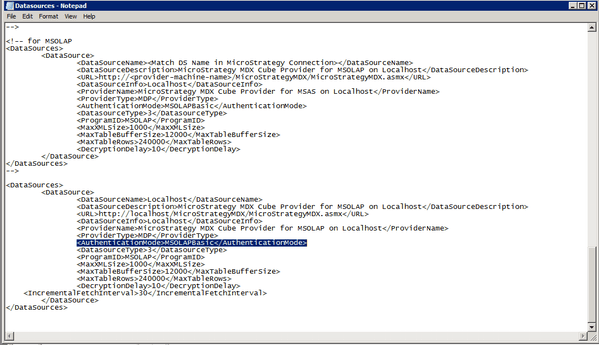
There are 2 possible values for the “AuthenticationMode” parameter:
1) “MSOLAPIntegrated”: This would require a Kerberos configuration to validate against MSAS. Refer to the section “Additional Kerberos Configuration” on this document.
2) “MSOLAPBasic”: This would simply pass on the login and password configured in the Strategy Database Instance connection login or at the user level when using Connection Mapping or Warehouse Passthrough.
MICROSOFT ODBO FOR OLAP (OLE DB DRIVER FOR SSAS)
In order for the Strategy MDX Provider to work, the machine hosting it should have the Microsoft OLE DB Provider for OLAP installed in the same box. This component can be understood as a driver used by the Strategy MDX provider to talk to SSAS and it can be downloaded directly from Microsoft when searching for the string “Microsoft SQL Server [version] Analysis Services OLE DB Provider” in the corresponding MS SQL Server Feature Pack pages.
For example, for version 2012, the following link points to the Microsoft SQL Server 2012 Feature Pack: http://www.microsoft.com/en-us/download/details.aspx?id=29065
DATABASE INSTANCE SETUP
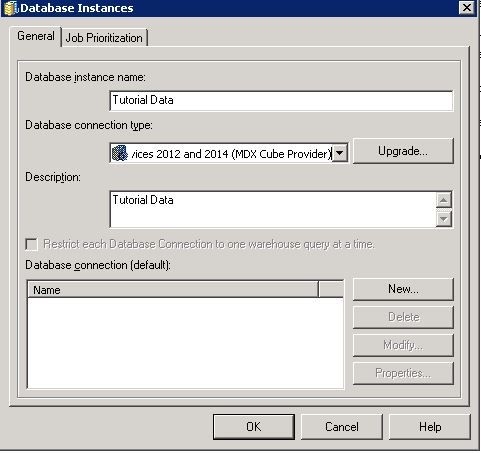
The database type for the SSAS Database Instance should be set as: “Microsoft Analysis Services 2012 and 2014 (MDX Cube Provider)” as shown in the following screenshot :
Connection Setup
The Strategy DB connection object should be configured as given below:

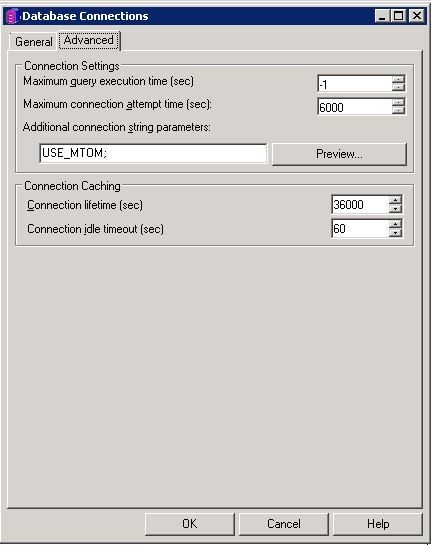
In addition, the Advanced tab in the Database Connection must contain the string “USE_MTOM;" as an additional connection string parameter as shown below:
For a basic connection to SSAS (“MSOLAPBasic”), the Database Login defined should be a SSAS user that has all the required privileges to access the data. This is the simplest way to connect to SSAS.
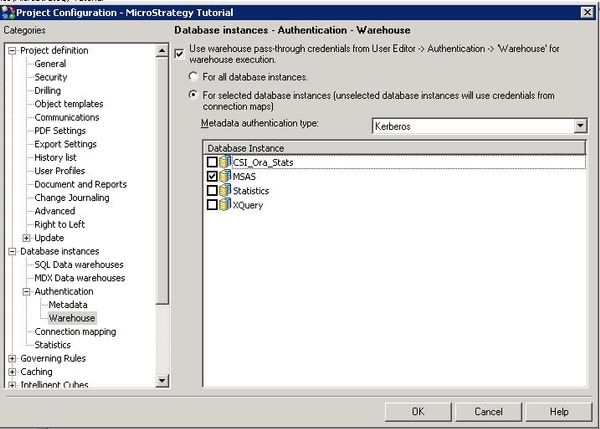
In case Kerberos Authentication (“MSOLAPIntegrated”) is required, there are 2 possibilities:
ADDITIONAL KERBEROS CONFIGURATION:
In order to use Kerberos authentication by selecting “MSOLAPIntegrated” configuration, all the components responsible for the connection to SSAS will need to be configured for Kerberos authentication (i.e. the Intelligence Server, the Web Application Server hosting the Strategy MDX Provider and SSAS).
In order to configure Kerberos Authentication for the Strategy Intelligence Server component, refer to the following Technical Notes:
For the Web Application Server Configuration / Strategy MDX Provider component, refer to the following Technical Notes:
For the SSAS Kerberos configuration side, refer to Microsoft's documentation.
