EducationSoftwareStrategy.com
StrategyCommunity

Knowledge Base

Product

Community

Knowledge Base

TopicsBrowse ArticlesDeveloper Zone

Product

Download SoftwareProduct DocumentationSecurity Hub

Education

Tutorial VideosSolution GalleryEducation courses

Community

GuidelinesGrandmastersEvents
x_social-icon_white.svglinkedin_social-icon_white.svg
Strategy logoCommunity

© Strategy Inc. All Rights Reserved.

LegalTerms of UsePrivacy Policy
  1. Home
  2. Topics

KB290307: Documents with derived attributes cannot be edited within MicroStrategy Developer 10.x


Stefan Zepeda

Salesforce Solutions Architect • Strategy


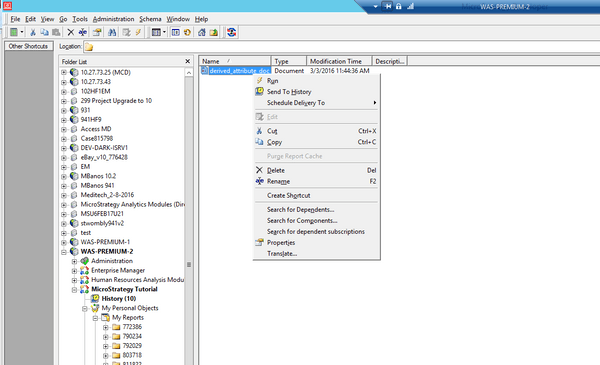
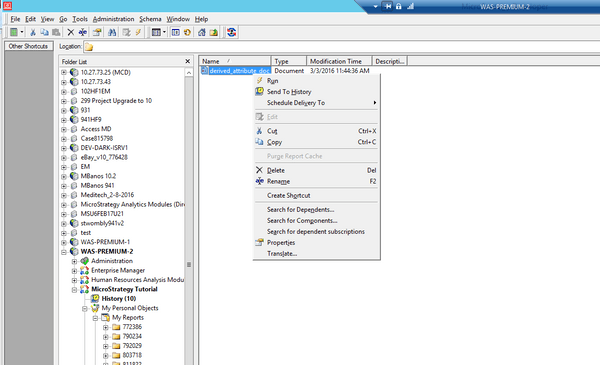
When trying to edit a document created in MicroStrategy Web using MicroStrategy Developer 10.x, the 'Edit' button is found greyed out and inaccessible as per the screenshot below. When navigating to the same document in MicroStrategy Web 10.x, it is possible to edit the document.

SUMMARY:
When trying to edit a document created in Strategy Web using Strategy Developer 10.x, the 'Edit' button is found greyed out and inaccessible as per the screenshot below. When navigating to the same document in Strategy Web 10.x, it is possible to edit the document.
ka02R000000kbrmQAA_0EM440000002C2B.jpeg

STEPS TO REPRODUCE:

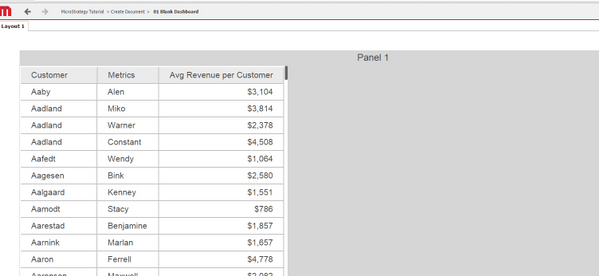
  • Create a document in Strategy Developer or Web 10.x with any number of attributes. See below:

ka02R000000kbrmQAA_0EM440000002C29.jpeg
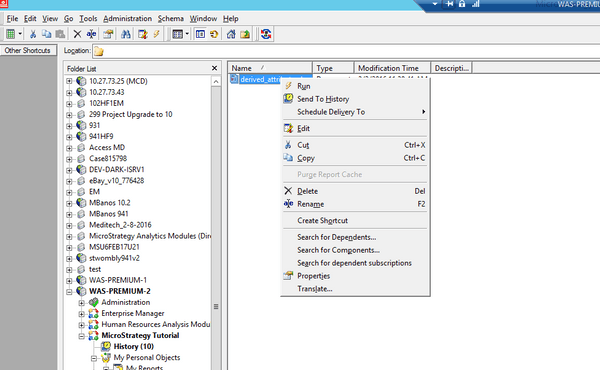
  • Notice in Developer, you can currently right click on this document and select the 'Edit' option.
ka02R000000kbrmQAA_0EM440000002C2E.jpeg
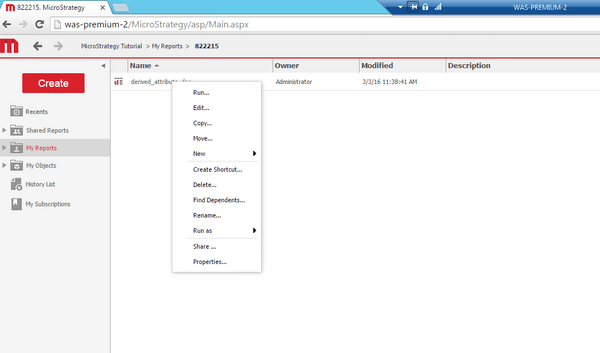
  • Open up the same document in Strategy Web 10.x and add a derived attribute, right clicking an attribute and selecting Insert new attribute.
ka02R000000kbrmQAA_0EM440000002C2D.jpeg
  • Save the report in Strategy Web 10.x with the same name.
  • Open Strategy Developer 10.x, and right click the document, you will notice that the Edit option is greyed out as seen below:
ka02R000000kbrmQAA_0EM440000002C2F.jpeg
  • Navigate to the same document within Strategy Web 10.x and see that we can still Edit this document via Strategy Web:
ka02R000000kbrmQAA_0EM440000002C2D.jpeg

 
CAUSE: 
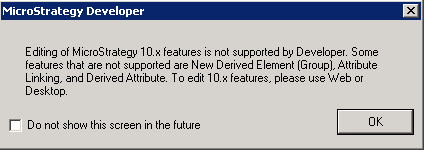
This is by design for Strategy Developer 10.0-10.5.  Derived Attributes are a Web only feature, and once added, the document will only be editable through Strategy Web.
 
ACTION:
The ability to edit documents with a Derived Attribute has been added in Strategy Developer 10.6.  Upgrade to this version to take advantage of the new feature.
 
NOTE: Some Strategy 10.x features are still only configurable through Strategy Web.  Although you can now edit and save documents with these features in Developer, the editing of those particular features will be disabled in Developer.
ka02R000000kbrmQAA_0EM440000002C2G.jpeg


WORKAROUND:
Once a derived attribute has been added to the document, please use Strategy Web or Desktop to edit the document.
 
The Strategy Internal Reference Number for the issue discussed in this technical note is US22816.


Comment

0 comments

Details

Knowledge Article

Published:

June 7, 2017

Last Updated:

June 7, 2017