EducationSoftwareStrategy.com
StrategyCommunity

Knowledge Base

Product

Community

Knowledge Base

TopicsBrowse ArticlesDeveloper Zone

Product

Download SoftwareProduct DocumentationSecurity Hub

Education

Tutorial VideosSolution GalleryEducation courses

Community

GuidelinesGrandmastersEvents
x_social-icon_white.svglinkedin_social-icon_white.svg
Strategy logoCommunity

© Strategy Inc. All Rights Reserved.

LegalTerms of UsePrivacy Policy
  1. Home
  2. Topics

KB290608: How to save a workflow as encrypted in System Manager 10.x?


Community Admin

• Strategy


Starting in MicroStrategy System Manager 10.x, users can save a workflow as an encrypted file so that passwords and other sensitive information are not visible when editing the saved workflow with a text editor. This KB goes into detail on how to do so.

Starting in Strategy System Manager 10.x, users can save a workflow as an encrypted file so that passwords and other sensitive information are not visible when editing the saved workflow with a text editor.
 
STEPS
These are the steps to encrypt a workflow in System Manager 10.x:
  • Access System Manager and create a workflow as wished.
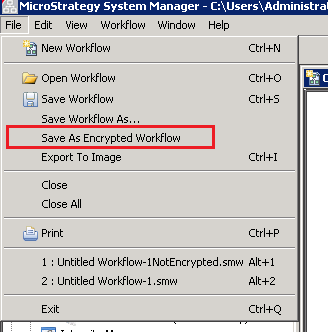
  • Once the workflow is created, go to File menu and select "Save As Encrypted Workflow", as shown below:
ka04W000000OheNQAS_0EM4400000029CL.jpeg
  • The workflow will be saved as a file with .smw extension with all the information encrypted.


Comment

0 comments

Details

Knowledge Article

Published:

May 4, 2017

Last Updated:

May 4, 2017