EducationSoftwareStrategy.com
StrategyCommunity

Knowledge Base

Product

Community

Knowledge Base

TopicsBrowse ArticlesDeveloper Zone

Product

Download SoftwareProduct DocumentationSecurity Hub

Education

Tutorial VideosSolution GalleryEducation courses

Community

GuidelinesGrandmastersEvents
x_social-icon_white.svglinkedin_social-icon_white.svg
Strategy logoCommunity

© Strategy Inc. All Rights Reserved.

LegalTerms of UsePrivacy Policy
  1. Home
  2. Topics

KB291083: Command Manager script 'LIST ALL CHANGE JOURNALINGS' does not show all entries in MicroStrategy 10.x


Community Admin

• Strategy


The issue described in this document has been classified as a defect by MicroStrategy.  The issue occurs when running the script LIST ALL CHANGE JOURNALINGS in MicroStrategy Command Manager 10.x.  This defect is addressed in MicroStrategy version 10.4 Hotfix 2 and newer.

SUMMARY:
The issue described in this document has been classified as a defect by Strategy.  The issue occurs when running the script LIST ALL CHANGE JOURNALINGS in Strategy Command Manager 10.x.  This defect is fixed in Strategy version 10.4 Hotfix 2 and newer. 
 
DESCRIPTION:
When a user executes the Strategy Command Manager Script "LIST ALL CHANGE JOURNALINGS" they may notice that not all Change Journaling entries are displayed.
 
STEPS TO REPRODUCE:
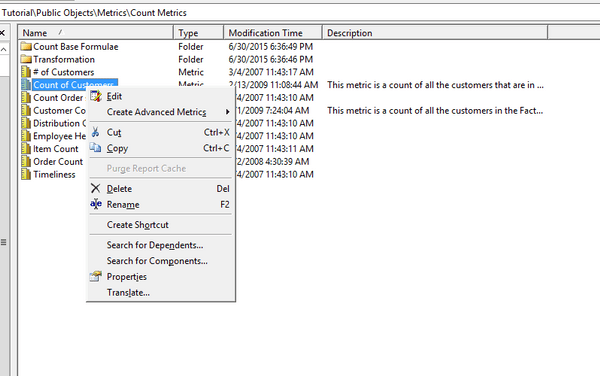
  • Consider a machine which has Developer installed and a machine which has the Intelligence Server installed.  On the machine with Developer, connect to the Intelligence Server via a 3-tier project course.
     
  • Navigate to Strategy Tutorial > Public Objects > Metircs > Count Metrics.  Right click the metric '# of Customer' and select the action 'Copy' 

ka04W000000ObRUQA0_0EM4400000029BV.jpeg
  • The dialogue box titled 'Change Comments' will appear. Write an entry here and select 'Okay' 
ka04W000000ObRUQA0_0EM4400000029BY.jpeg
  • From either machine, launch Command Manager and connect to the Intelligence Server via a 3-tier project source.
     
  • Run the script LIST ALL CHANGE JOURNALINGS. Notice that the Change Journal entry created in Step 3 is not present.

ka04W000000ObRUQA0_0EM4400000029BX.jpeg

CAUSE:
When a user connects in Command Manager, they choose a 3-tier project source which they would like to connect to. The project source connects a specified server using either an IP address, machine name, or fully qualified domain name (depending on what was specified when the project source was created). The LIST ALL CHANGE JOURNALINGS script filters by the machine name specified in the project source. So if the project source uses an IP address, the Command Manager script will only return change journal entries whose machine name was logged as the IP address. As a result, it will exclude all entries from other machines and will exclude entries which use the machine name or fully qualified domain name instead of the IP address.
 
This is an identified defect in Strategy Command Manager 10.x.
 
ACTION:
This defect is addressed in Strategy version 10.4 Hotfix 2 and newer. 
 
WORKAROUND:
Use Developer in order to see all Change Journal entries.  To view Change Journal entries in Developer, navigate to Administration > System Monitors > Change Journal Transactions.
 
The Strategy Internal Reference Number for the issue discussed in this technical note is DE46796
KB291083


Comment

0 comments

Details

Knowledge Article

Published:

June 8, 2017

Last Updated:

December 28, 2018