EducationSoftwareStrategy.com
StrategyCommunity

Knowledge Base

Product

Community

Knowledge Base

TopicsBrowse ArticlesDeveloper Zone

Product

Download SoftwareProduct DocumentationSecurity Hub

Education

Tutorial VideosSolution GalleryEducation courses

Community

GuidelinesGrandmastersEvents
x_social-icon_white.svglinkedin_social-icon_white.svg
Strategy logoCommunity

© Strategy Inc. All Rights Reserved.

LegalTerms of UsePrivacy Policy
  1. Home
  2. Topics

KB292121:"SemanticException Failed to breakup Windowing invocations into Groups" error occurs when using Windowing functions in MicroStrategy reports


Community Admin

• Strategy


In MicroStrategy Secure Enterprise 10.x, the following error message occurs while using Windowing functions in MicroStrategy reports that connect to a Hive data warehouse: Error type: Odbc error. Odbc operation attempted: SQLExecDirect. [S1000:80: on HSTMT] [MicroStrategy][HiveODBC] (80) Syntax or semantic analysis error thrown in server while execurint query. Error message from server: Error while compiling statement: FAILED: SemanticException Failed to breakup Windowing invocations into Groups. At least 1 group must only depend on input columns. Also check for circular dependencies.

 
SYMPTOM
In Strategy Secure Enterprise 10.x, the following error message occurs while using Windowing functions in Strategy reports that connect to a Hive data warehouse:


Error type: Odbc error. Odbc operation attempted: SQLExecDirect. [S1000:80: on HSTMT] [Strategy][HiveODBC] (80) Syntax or semantic analysis error thrown in server while execurint query. Error message from server: Error while compiling statement: FAILED: SemanticException Failed to breakup Windowing invocations into Groups. At least 1 group must only depend on input columns. Also check for circular dependencies.

 
CAUSE
This occurs because of Hive processing Windowing functions in the end, after the selects, joins, group-by clauses, thus resulting in the error.
Refer to HIVE documentation for more details about the issue:
https://issues.apache.org/jira/browse/HIVE-4663
 
 
WORKAROUND
This issue can be worked around in Strategy by including the attribute/metric in the report definition. The Windowing function can either be a part of report definition or the filter definition
 

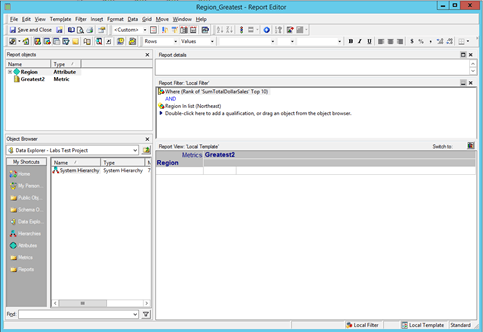
  • Scenario 1: Windowing function is part of Report Filter

 Refer to the sample report below:

ka04W000000OhE5QAK_0EM440000002J9u.jpeg

 The SQL is below:


select a12.region_id region_id,
rank () over( order by sum(a11.tot_dollar_sales) desc) WJXBFS1
from labstuto.city_ctr_sls a11
join labstuto.lu_call_ctr a12
on (a11.call_ctr_id = a12.call_ctr_id)
where a12.region_id in (1)
group by a12.region_id
 
WORKAROUND:
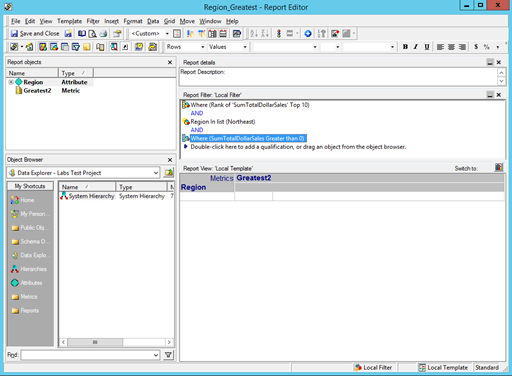
Add tot_dollar_sales to the select list of the query.
This can be achieved by adding the Sum_total_dollar_sales to the report filter definition.  The condition doesn't affect the report end result. For example, in the sample report, the sum(tot_dollar_sales) expression always yields a positive result . Hence the following report filter was added to the report

ka04W000000OhE5QAK_0EM440000002JA5.jpeg

The report executes successfully as shown below:
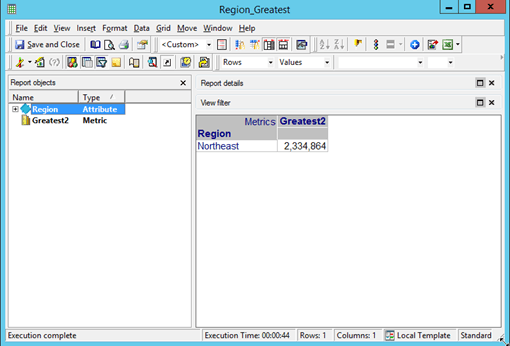
ka04W000000OhE5QAK_0EM440000002J9w.jpeg


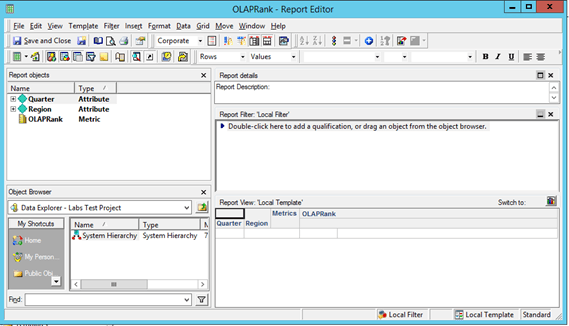
  • Scenario 2: Windowing function is part of Report Definition

Refer to the sample report below:

ka04W000000OhE5QAK_0EM440000002J9o.jpeg

The SQL is below:


select a12.quarter_id quarter_id,
max(a13.quarter_desc) quarter_desc,
a11.region_id region_id,
max(a14.region_name) region_name,
rank() over ( partition by a12.quarter_id order by sum(a11.tot_dollar_sales) asc, a11.region_id asc ) WJXBFS1
from labstuto.state_region_mnth_sls a11
join labstuto.lu_month a12
on (a11.month_id = a12.month_id)
join labstuto.lu_quarter a13
on (a12.quarter_id = a13.quarter_id)
join labstuto.lu_region a14
on (a11.region_id = a14.region_id)
group by a12.quarter_id,
a11.region_id
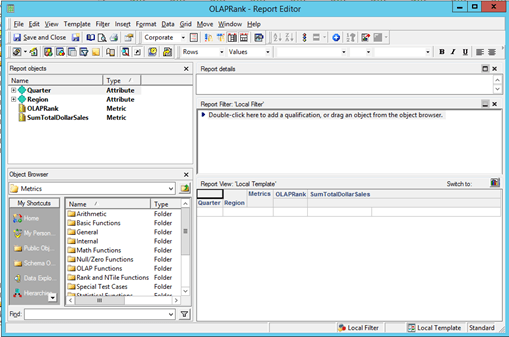
 
WORKAROUND
 Add tot_dollar_sales to the select list of the query.
This can be achieved by adding the Sum_total_dollar_sales to the report definition.
For example in the sample report SumTotalDollarSales, an additional metric should be added. 

ka04W000000OhE5QAK_0EM440000002J9s.jpeg

 
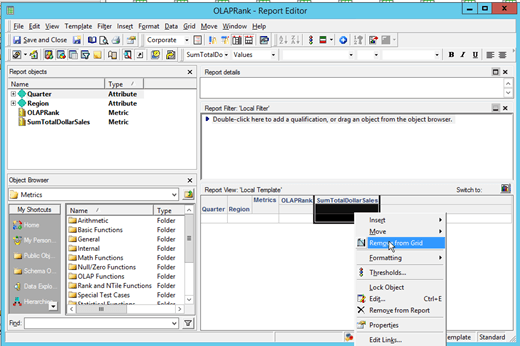
If the user doesn't want the 'SumTotalDollarSales' column to be displayed as part of the report, just right-click on the column and select 'remove from grid' as shown below:
ka04W000000OhE5QAK_0EM440000002J9y.jpeg

 
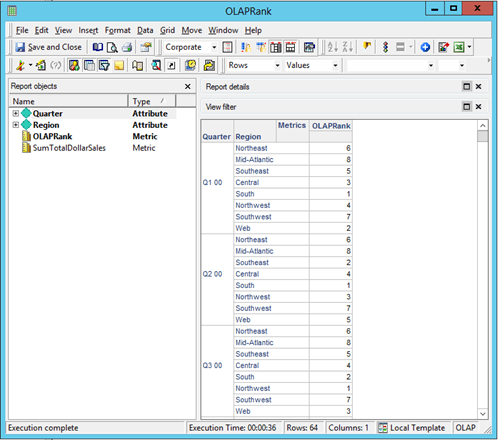
The report executes successfully as shown below:
ka04W000000OhE5QAK_0EM440000002J9k.jpeg


Comment

0 comments

Details

Knowledge Article

Published:

May 30, 2017

Last Updated:

May 30, 2017