EducationSoftwareStrategy.com
StrategyCommunity

Knowledge Base

Product

Community

Knowledge Base

TopicsBrowse ArticlesDeveloper Zone

Product

Download SoftwareProduct DocumentationSecurity Hub

Education

Tutorial VideosSolution GalleryEducation courses

Community

GuidelinesGrandmastersEvents
x_social-icon_white.svglinkedin_social-icon_white.svg
Strategy logoCommunity

© Strategy Inc. All Rights Reserved.

LegalTerms of UsePrivacy Policy
  1. Home
  2. Topics

KB292208: "Object variable or with block not set" error occurs when accessing the Devices section in MicroStrategy Developer 10.3.


Stefan Zepeda

Salesforce Solutions Architect • Strategy


"Object variable or with block not set" error occurs when accessing the Devices section in MicroStrategy Developer 10.3.

SUMMARY:
This document describes an issue that occurs due to a metadata inconsistency in the Intelligence Server configuration, which is exposed through Strategy Developer 10.3.
 
SYMPTOM:
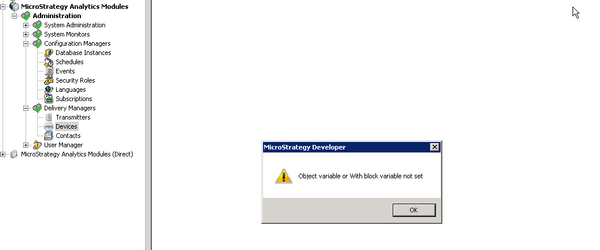
When trying to access the Device section for a particular project source, the following error appears:
ka02R000000kbKxQAI_0EM440000002C1z.jpeg


Once the error message is accepted, the list of Devices will not be displayed. However, it is possible to get a list of Devices linked to that project source, by running the following outline in Command Manager:


LIST ALL DEVICES;

 
CAUSE:
This behavior occurs due to a metadata inconsistency in which a Device object has lost its link to a Transmitter.
 
ACTION:
 In order to track down the cause of the inconsistency, customers encountering this issue should make note of related object manipulations, Object Migrations, or error messages prior to experiencing the problem.  Change Journaling, if it has been enabled, can help in preserving this information.
 
WORKAROUND:
Use the following outline in Command Manager to get the device list:
 

LIST ALL DEVICES;


Comment

0 comments

Details

Knowledge Article

Published:

April 12, 2017

Last Updated:

July 17, 2017