SYMPTOM:
The message “Photo not found” is displayed in Image viewer or the image cannot be displayed via relative path if the image is uploaded by Photo Uploader widget in Strategy Mobile 10.3 as below:

However the images uploaded by Photo Uploader widget does exist in ./<mobile server path>/savedImages folder. And the image can be displayed with absolute path.
CAUSE:
This is a known issue specified with Strategy Mobile 10.3. The virtual directory for the folder savedImages might be not correctly created by Photo uploader widget.
ACTION:
This issue has been addressed in Strategy Mobile 10.4 Hotfix 1 . Upgrade to this version or later to take advantage of this fix.
WORKAROUND:
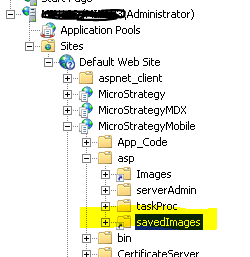
1.For IIS, the most convenient workaround to is to manually create the the virtual directory for the folder savedImages under Mobile server.
After it is correctly added, it should look like the below image:
2. For JSP web server like Tomcat:
It might not be that convenient to add similar virtual directory for JSP server. Then users can use relative path “../savedImages/xxxxx.jpg” to refer the images.
The default path is with format “savedImages/xxxxx.jpg”. An example is to modify the transaction service SQL to insert image path. Modify the SQL to add “../” ahead so that the inserted path becomes “../savedImages/xxxxx.jpg”, as below example to insert data to Access database(the syntax varies according to database type):

KB293943
