EducationSoftwareStrategy.com
StrategyCommunity

Knowledge Base

Product

Community

Knowledge Base

TopicsBrowse ArticlesDeveloper Zone

Product

Download SoftwareProduct DocumentationSecurity Hub

Education

Tutorial VideosSolution GalleryEducation courses

Community

GuidelinesGrandmastersEvents
x_social-icon_white.svglinkedin_social-icon_white.svg
Strategy logoCommunity

© Strategy Inc. All Rights Reserved.

LegalTerms of UsePrivacy Policy
  1. Home
  2. Topics

KB294936: Users get the “Invalid login mode” error when accessing a project with its name in Chinese in MicroStrategy Web


Community Admin

• Strategy


Users get the “Invalid login mode” error when accessing a project with its name in Chinese in MicroStrategy Web.

SYMPTOM:
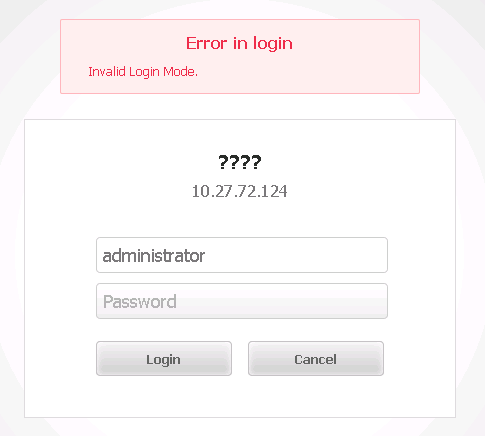
After deploying Strategy Web 10.3 in a Tomcat 8 Web Server, users get the “Invalid login mode” error when accessing a project with its name in Chinese.
 
STEPS TO REPRODUCE:
  • Deploy Strategy Web 10.3 in Tomcat 8.
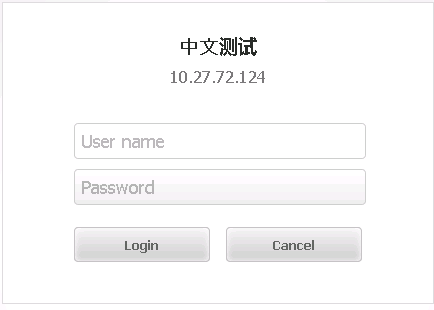
  • Open Strategy Web and enter the user name and password to access a project with its name in Chinese.

ka04W000000OfhyQAC_0EM4400000025V9.jpeg
  • The error message “Invalid Login Mode” is returned and the project name turns into question marks.

ka04W000000OfhyQAC_0EM4400000025V8.jpeg
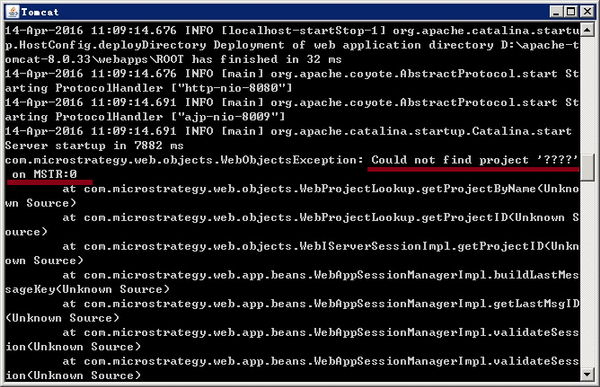
  • Tomcat log file also returns: Could not find project ‘???’

ka04W000000OfhyQAC_0EM4400000025V4.jpeg

CAUSE: 
Chinese characters cannot be recognized by Tomcat 8.
 
Workaround:
Modify the server.xml file under Tomcat and insert the following line to the <Connector> node:
URIEncoding="GBK"  useBodyEncodingForURI="true"
 

ka04W000000OfhyQAC_0EM4400000025V7.jpeg

 
Restart Tomcat after doing the modification.


Comment

0 comments

Details

Knowledge Article

Published:

May 17, 2017

Last Updated:

August 9, 2017