EducationSoftwareStrategy.com
StrategyCommunity

Knowledge Base

Product

Community

Knowledge Base

TopicsBrowse ArticlesDeveloper Zone

Product

Download SoftwareProduct DocumentationSecurity Hub

Education

Tutorial VideosSolution GalleryEducation courses

Community

GuidelinesGrandmastersEvents
x_social-icon_white.svglinkedin_social-icon_white.svg
Strategy logoCommunity

© Strategy Inc. All Rights Reserved.

LegalTerms of UsePrivacy Policy
  1. Home
  2. Topics

KB297145: How to configure a custom home screen in MicroStrategy Mobile 10.x with Usher Authentication Mode?


Community Admin

• Strategy


Currently, it is not possible to configure a custom home screen when using Usher authentication. This article provides a workaround to that limitation.

SUMMARY:
This document describes a current limitation in Strategy Mobile server 10.x that prevents users from adding a custom home screen when using Usher to log into the project. A workaround is provided.
 
SYMPTOM:
Due to a limitation of the mobile server, users cannot configure a custom home screen in the Strategy Mobile configuration when Usher is used as the project authentication method.
 
WORKAROUND:
Follow these steps to work around the above described behavior:
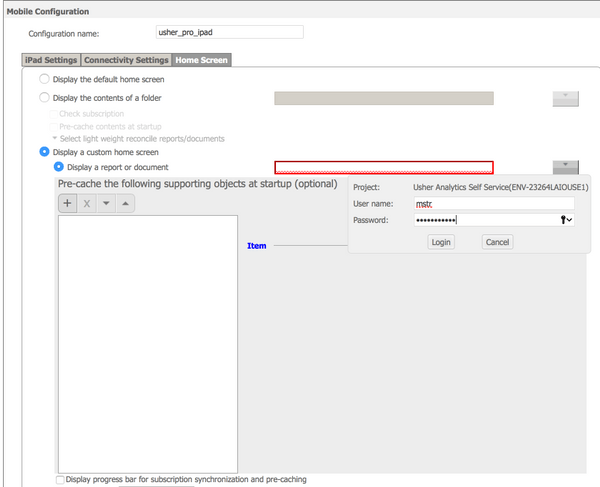
  • Create a Mobile Configuration or edit an existing one.
  • In the "Connectivity Settings" tab, set "authentication mode" to Standard:

     
  • In the "Home Screen" tab, configure the custom home screen as needed:
ka04W000001MKtBQAW_0EM4400000029oR.jpeg
  • Go back to the "Connectivity Settings" tab and change the project Authentication Mode to Usher:


The Strategy Internal Reference Number for this behavior is DE36515.


Comment

0 comments

Details

Knowledge Article

Published:

April 4, 2017

Last Updated:

April 4, 2017