EducationSoftwareStrategy.com
StrategyCommunity

Knowledge Base

Product

Community

Knowledge Base

TopicsBrowse ArticlesDeveloper Zone

Product

Download SoftwareProduct DocumentationSecurity Hub

Education

Tutorial VideosSolution GalleryEducation courses

Community

GuidelinesGrandmastersEvents
x_social-icon_white.svglinkedin_social-icon_white.svg
Strategy logoCommunity

© Strategy Inc. All Rights Reserved.

LegalTerms of UsePrivacy Policy
  1. Home
  2. Topics

KB299639: In MicroStrategy, the following error is encountered when executing Enterprise Manager related scripts through Command Manager on Linux: “Error while adding the environment. Failed to retrieve RMIServer stub”


Community Admin

• Strategy


This Technical note addresses an issue when trying to execute Enterprise Manager related scripts through Command Manager on a Linux machine in MicroStrategy. The issue is specifically with the remote interaction of Command Manager and Enterprise Manager. In the current state, it is recommended that Enterprise Manager Service and Command Manager be on the same Linux machine in order for the Enterprise Manager related commands to work. 

SUMMARY:
This Technical note addresses an issue when trying to execute Enterprise Manager related scripts through Command Manager on a Linux machine in Strategy.
 
SYMPTOM:
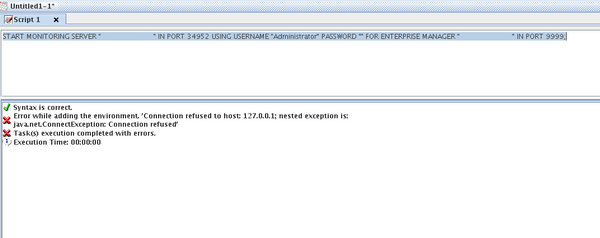
When executing the “Start Monitoring” Enterprise Manager script through Command Manager on Linux, the following error occurs:
 

ka0PW0000000r17YAA_0EM4400000029Bp.jpeg


“Error Code:-2147154915 Error while adding the environment. 'Failed to retrieve RMIServer stub: javax.naming.CommunicationException [Root exception is java.rmi.ConnectIOException: Exception creating connection to: <IP ADDRESS>; nested exception is: 
java.net.NoRouteToHostException: No route to host]'”

 
STEPS TO REPRODUCE:

  1. Start the Enterprise Manager Service on a Linux Machine (Linux Machine A).
     
  2. Launch Command Manager from Linux Machine B and run execute “Start Monitoring” command:


START MONITORING SERVER “<I-Server_machine_name>” IN PORT <port_number> USING USERNAME “<username>” PASSWORD “<password>” FOR ENTERPRISE MANAGER “<em_machine>” IN PORT <em_port>;


  1. The command fails with error:


“Error Code:-2147154915 Error while adding the environment. 'Failed to retrieve RMIServer stub: javax.naming.CommunicationException [Root exception is java.rmi.ConnectIOException: Exception creating connection to: <IP ADDRESS>; nested exception is: 
java.net.NoRouteToHostException: No route to host]'”

 
ACTION:
Launch Command Manager from the same Linux machine that the Enterprise Manager Service is running on.

KB299639


Comment

0 comments

Details

Knowledge Article

Published:

June 6, 2017

Last Updated:

February 26, 2024