EducationSoftwareStrategy.com
StrategyCommunity

Knowledge Base

Product

Community

Knowledge Base

TopicsBrowse ArticlesDeveloper Zone

Product

Download SoftwareProduct DocumentationSecurity Hub

Education

Tutorial VideosSolution GalleryEducation courses

Community

GuidelinesGrandmastersEvents
x_social-icon_white.svglinkedin_social-icon_white.svg
Strategy logoCommunity

© Strategy Inc. All Rights Reserved.

LegalTerms of UsePrivacy Policy
  1. Home
  2. Topics

KB299734: Failover does not occur on Mobile devices when connected to the primary node in an Intelligence Server cluster


Community Admin

• Strategy


The issue described in this document has been classified as a defect by MicroStrategy. Mobile users may encounter an error in the Mobile app if a node in the cluster crashes. A solution/code fix for this issue is not available in current releases, but is being reviewed for a future MicroStrategy release.

SUMMARY:
The issue described in this document has been classified as a defect by Strategy.  Mobile users may encounter an error in the Mobile app if a node in the cluster crashes.  A solution/code fix for this issue is not available in current releases, but is being reviewed for a future Strategy release.
 
DESCRIPTION:
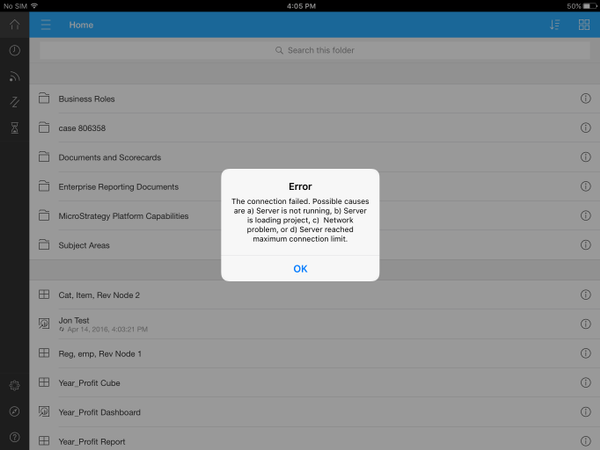
In a clustered Intelligence Server environment, Mobile users are automatically connected to a node in the cluster. If Mobile users are connected to the primary node in a cluster, and the primary node crashes, users will see the following error.
ka04W000000OhYpQAK_0EM4400000029o5.jpeg


Error
The connection failed. Possible causes are a) Server is not running, b) Server is loading project, c) Network problem, or d) Server reach maximum connection limi.

 
If Mobile users are connected to a secondary node in the cluster, and the secondary node crashes, failover will occur as expected. Users will be automatically connected to a different node in the cluster and will not experience any interruption in use of the Mobile app.
 
CAUSE:
This is an identified defect in Strategy 10.x.
 
ACTION:
Currently this issue is still being reviewed for feasibility by our Technology team and is not scoped for any upcoming scheduled Strategy release.
 
WORKAROUND:
After the error appears on the Mobile device, click OK.  Clear the cached data on the app and restart the app.  Users will now be connected to a node that is running.
 
The Strategy Internal Reference Number for the issue described in this technical note is DE32876.


Comment

0 comments

Details

Knowledge Article

Published:

May 15, 2017

Last Updated:

May 15, 2017