SYMPTOM:
When trying to connect to Oracle Essbase in Strategy 10.x, users get following error message which contains little useful information.
<?xml version="1.0" encoding="utf-8"?><soap:Envelope xmlns:soap="http://schemas.
xmlsoap.org/soap/envelope/" xmlns:xsi="http://www.w3.org/2001/XMLSchema-instance
" xmlns:xsd="http://www.w3.org/2001/XMLSchema" xmlns:wsa="http://schemas.xmlsoap
.org/ws/2004/08/addressing" xmlns:wsse="http://docs.oasis-open.org/wss/2004/01/o
asis-200401-wss-wssecurity-secext-1.0.xsd" xmlns:wsu="http://docs.oasis-open.org
/wss/2004/01/oasis-200401-wss-wssecurity-utility-1.0.xsd"><soap:Header><wsa:Acti
on>http://schemas.xmlsoap.org/ws/2004/08/addressing/fault</wsa:Action><wsa:Messa
geID>urn:uuid:1a83feb8-d37a-420d-9ed8-76eb33a628b9</wsa:MessageID><wsa:RelatesTo
>urn:uuid:7a6a801a-c777-4734-8da7-02e24a397990</wsa:RelatesTo><wsa:To>http://sch
emas.xmlsoap.org/ws/2004/08/addressing/role/anonymous</wsa:To><wsse:Security><ws
u:Timestamp wsu:Id="Timestamp-957cce5f-70af-4b8b-8884-f7e5748d2505"><wsu:Created
>2016-03-21T09:44:32Z</wsu:Created><wsu:Expires>2016-03-21T09:49:32Z</wsu:Expire
s></wsu:Timestamp></wsse:Security></soap:Header><soap:Body><soap:Fault><faultcod
e>soap:Client</faultcode><faultstring>System.Web.Services.Protocols.SoapExceptio
n: Fault occurred
   at Service.Discover(String RequestType, XmlElement Restrictions, XmlElement P
roperties)</faultstring><faultactor>http://widcb2b101/StrategyMDX/MicroStra
tegyMDX.asmx</faultactor><detail><MSTRXmlaErrorCode MSTRXmla:Code="00000000" xml
ns:MSTRXmla="urn:schemas-microsoft-com:xml-analysis" xmlns="urn:schemas-microsof
t-com:xml-analysis" /><MSTRXmlaErrorString MSTRXmla:String="SessionHandler: Conn
ectionError:  (Server message -1)        (Server message -1)" xmlns:MSTRXmla="ur
n:schemas-microsoft-com:xml-analysis" xmlns="urn:schemas-microsoft-com:xml-analy
sis" /><InternalErrorCode MSTRXmla:Code="0" xmlns:MSTRXmla="urn:schemas-microsof
t-com:xml-analysis" xmlns="urn:schemas-microsoft-com:xml-analysis" /><InternalEr
rorString MSTRXmla:String="" xmlns:MSTRXmla="urn:schemas-microsoft-com:xml-analy
sis" xmlns="urn:schemas-microsoft-com:xml-analysis" /><StackTrace MSTRXmla:Strin
g="   at XMLA.OCI.DiscoverHandler.getSchemaInfo(String iSchemaType, StringBuilde
r sbRowXml, XmlElement RestrictionList, XmlElement PropertyList, XmlElement conn
ectionInfo, String iUserID, String iPwd, String iUsePool)
   at Service
.Discover(String RequestType, XmlElement Restrictions, XmlElement Properties)" x
mlns:MSTRXmla="urn:schemas-microsoft-com:xml-analysis" xmlns="urn:schemas-micros
oft-com:xml-analysis" /></detail></soap:Fault></soap:Body></soap:Envelope>
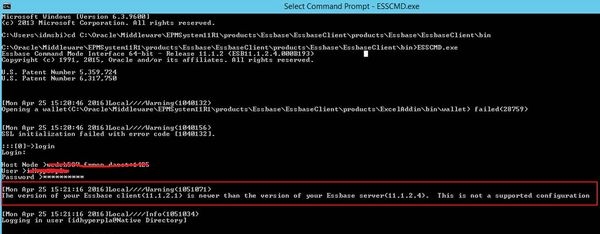
In this case, when using Essbase client to test the connection, following error message returns.
The version of your Essbase client(11.1.2.1) is newer than the version of your Essbase server(11.1.2.4). This is not a supported configuration.
