EducationSoftwareStrategy.com
StrategyCommunity

Knowledge Base

Product

Community

Knowledge Base

TopicsBrowse ArticlesDeveloper Zone

Product

Download SoftwareProduct DocumentationSecurity Hub

Education

Tutorial VideosSolution GalleryEducation courses

Community

GuidelinesGrandmastersEvents
x_social-icon_white.svglinkedin_social-icon_white.svg
Strategy logoCommunity

© Strategy Inc. All Rights Reserved.

LegalTerms of UsePrivacy Policy
  1. Home
  2. Topics

KB300216: "Could not display "alertEditor" using "AlertsSubscriptionEditStyle" as style" error occurs when editing alert subscription in MicroStrategy Web


Community Admin

• Strategy


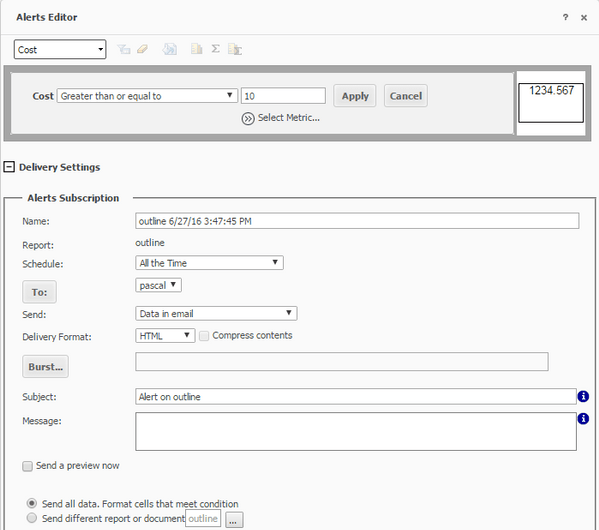
Could not display "alertEditor" using "AlertsSubscriptionEditStyle" as style.

Summary
When editing an alert subscription in Strategy Web 10.3, the following error occcurs

ka04W000000OftrQAC_0EM4400000025Un.jpeg


Could not display "alertEditor" using "AlertsSubscriptionEditStyle" as style
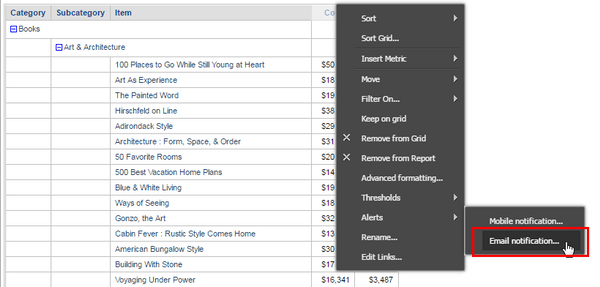
 
 
Steps to reproduce:
1. Create and run a report.
2. Right-click on a metric column header and select Alerts > Email notification.

ka04W000000OftrQAC_0EM4400000025Ul.jpeg

3. Set a condition.

ka04W000000OftrQAC_0EM4400000025Uo.jpeg

4. Press OK.
5. Go to My Subscriptions in Strategy Web.

ka04W000000OftrQAC_0EM4400000025Um.jpeg

6. Press the Edit button.
 
Cause
This is a known issue with Strategy Web 10.
 
Action
This issue has been addressed with Strategy 10.4. Upgrade to Strategy Web 10.4 in order to take advantage of the fix.


Comment

0 comments

Details

Knowledge Article

Published:

June 2, 2017

Last Updated:

June 2, 2017