EducationSoftwareStrategy.com
StrategyCommunity

Knowledge Base

Product

Community

Knowledge Base

TopicsBrowse ArticlesDeveloper Zone

Product

Download SoftwareProduct DocumentationSecurity Hub

Education

Tutorial VideosSolution GalleryEducation courses

Community

GuidelinesGrandmastersEvents
x_social-icon_white.svglinkedin_social-icon_white.svg
Strategy logoCommunity

© Strategy Inc. All Rights Reserved.

LegalTerms of UsePrivacy Policy
  1. Home
  2. Topics

KB300299: When exporting a VI Dashboard containing a line graph to PDF after changing one of the lines to a black color, the color is not changed in the export.


Community Admin

• Strategy


SUMMARY:
This issue has been classified as a defect by Strategy.  The impact is in the Operations Manager product. A solution/code fix for this issue is not available in current releases and has not been scoped for a future Strategy release.
SYMPTOM:
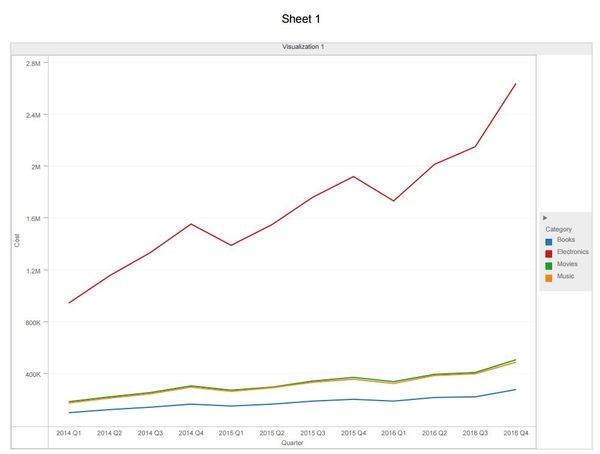
After making a color change to a line in a line graph in a VI dashboard, when an export to PDF is performed, the line does not maintain the color change:
STEPS TO REPRODUCE:
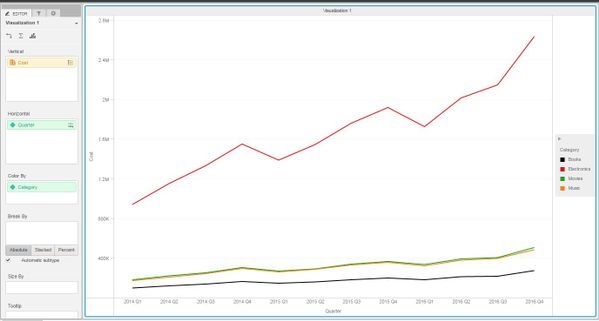
  1. Create a line graph visualization in a VI dashboard, with Cost in the Vertical axis. Quarter in the horizontal axis and Color by Category.
  2. Change the Books category to a black color.


ka04W000000OeP5QAK_0EM4400000025Rh.jpeg


  1. Export the VI dashboard to PDF.
  2. Notice the Books category still has a blue color.
ka04W000000OeP5QAK_0EM4400000025Rx.jpeg

CAUSE:
This is a known issue in Strategy Web 10.x.
ACTION:
This issue has been reviewed by the Technology team and has not been scoped for a future Strategy release.


Comment

0 comments

Details

Knowledge Article

Published:

June 9, 2017

Last Updated:

June 9, 2017