EducationSoftwareStrategy.com
StrategyCommunity

Knowledge Base

Product

Community

Knowledge Base

TopicsBrowse ArticlesDeveloper Zone

Product

Download SoftwareProduct DocumentationSecurity Hub

Education

Tutorial VideosSolution GalleryEducation courses

Community

GuidelinesGrandmastersEvents
x_social-icon_white.svglinkedin_social-icon_white.svg
Strategy logoCommunity

© Strategy Inc. All Rights Reserved.

LegalTerms of UsePrivacy Policy
  1. Home
  2. Topics

KB300359: Custom metric formatting in grid on Report Services document not rendering in Flash mode using MicroStrategy 10.


Community Admin

• Strategy


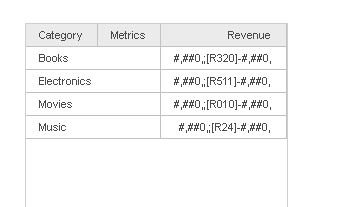
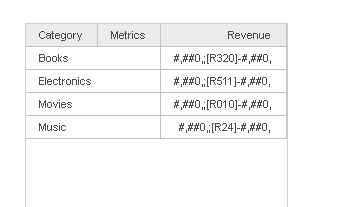
Customer metric formatting set on a grid does not render correctly when executing the report services document in Flash mode using MicroStrategy 10.x.

Summary
Customer metric formatting set on a grid does not render correctly when executing the report services document in Flash mode using Strategy 10.x.
ka04W000000OefNQAS_0EM4400000025UX.jpeg

Steps to reproduce
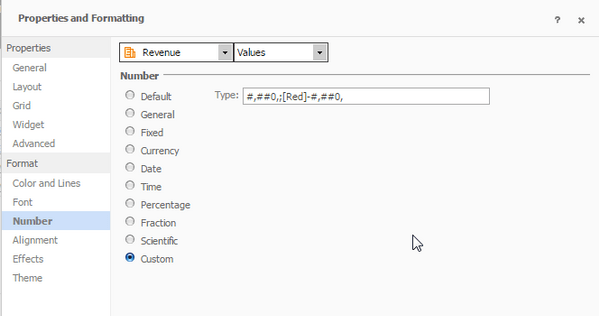
1. Apply custom formatting to a metric on a grid (Right-click metric value > Advanced Formatting > Number)
ka04W000000OefNQAS_0EM4400000025UZ.jpeg

2. Execute document in Flash mode

ka04W000000OefNQAS_0EM4400000025UW.jpeg

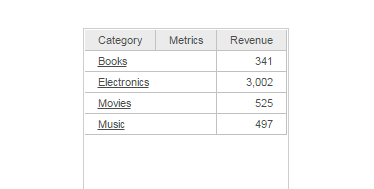
3. Execute the document in Presentation mode and note that the formatting is applied correctly
ka04W000000OefNQAS_0EM4400000025UY.jpeg

 
Cause
This is a known issue in Strategy 10.x
Action
This issue has been addressed with Strategy Web 10.3 Hotfix 2 and Strategy Web 10.4. Upgrade to take advantage of the fix.
Workaround
Switch the document to Presentation Mode to render custom formatting.


Comment

0 comments

Details

Knowledge Article

Published:

June 8, 2017

Last Updated:

June 8, 2017