EducationSoftwareStrategy.com
StrategyCommunity

Knowledge Base

Product

Community

Knowledge Base

TopicsBrowse ArticlesDeveloper Zone

Product

Download SoftwareProduct DocumentationSecurity Hub

Education

Tutorial VideosSolution GalleryEducation courses

Community

GuidelinesGrandmastersEvents
x_social-icon_white.svglinkedin_social-icon_white.svg
Strategy logoCommunity

© Strategy Inc. All Rights Reserved.

LegalTerms of UsePrivacy Policy
  1. Home
  2. Topics

KB300532: Users are Unable to edit attribute form of an attribute when used in a filter in a Visual Insight Dashboard.


Community Admin

• Strategy


SYMPTOM:
In Strategy Web 10.x, When using a report with an attribute with multiple attribute forms enabled as a data source for Visual Insight Dashboard. If an attribute is used as a filter both of the attribute forms will be displayed and cannot be altered.
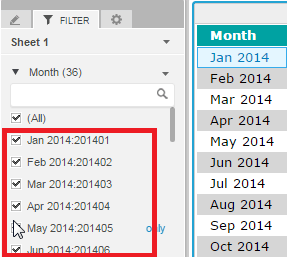
 

ka04W000000OfrUQAS_0EM4400000025NR.jpeg

 
STEPS TO REPRODUCE:
Follow these steps to reproduce the issue in a Strategy Tutorial Project
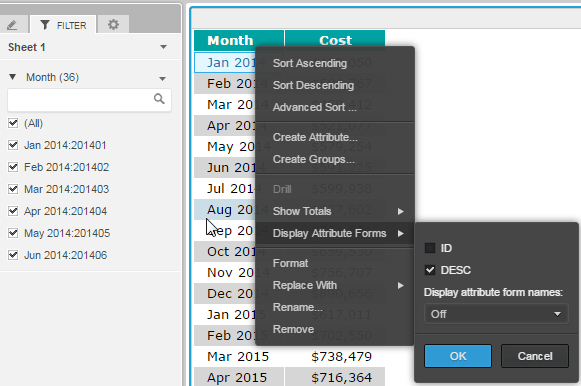
  • Create a report with the month attribute and enable the attribute ID form for DESC and ID
  • Save this report
  • Create a Visual Insight Dashboard based off of this report
  • Add the month attribute into the filter pane
  • notice both attribute forms are displayed
  • changing the display in the check box setting for the attribute doesn't affect the filter display.
ka04W000000OfrUQAS_0EM4400000025ND.jpeg

 
CAUSE:
This is an identified defect in Strategy 
ACTION: 
Currently this issue is being reviewed by Strategy for a potential code fix on an upcoming Strategy release.
 
The Strategy Internal Reference Number for the issue discussed in this technical note is DE37895.


Comment

0 comments

Details

Knowledge Article

Published:

June 12, 2017

Last Updated:

June 12, 2017