EducationSoftwareStrategy.com
StrategyCommunity

Knowledge Base

Product

Community

Knowledge Base

TopicsBrowse ArticlesDeveloper Zone

Product

Download SoftwareProduct DocumentationSecurity Hub

Education

Tutorial VideosSolution GalleryEducation courses

Community

GuidelinesGrandmastersEvents
x_social-icon_white.svglinkedin_social-icon_white.svg
Strategy logoCommunity

© Strategy Inc. All Rights Reserved.

LegalTerms of UsePrivacy Policy
  1. Home
  2. Topics

KB30076: How to change the authentication mode between Windows Authentication and Standard Authentication for a Project Source in MicroStrategy Developer 9.4.x-10.x


Stefan Zepeda

Salesforce Solutions Architect • Strategy


In MicroStrategy Developer it is not possible to enable both Windows Authentication and Standard Authentication for one project source at the same time. However, it is possible to specify the authentication mode for a local machine for a specific project source.

SYMPTOM:
In Strategy Developer it is not possible to enable both Windows Authentication and Standard Authentication for one project source at the same time. However, it is possible to specify the authentication mode for a local machine for a specific project source.
 
ACTION:
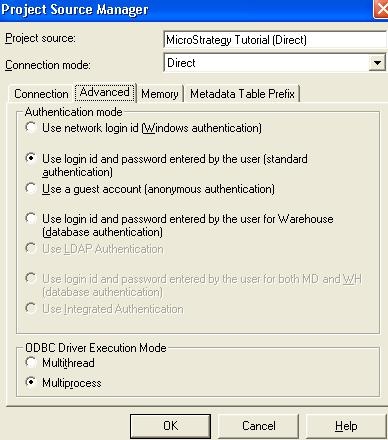
  1. Right-click on the project source and select 'Modify Project Source'.
  2. Go to the 'Advanced' tab.
  3. Select the appropriate authentication mode for this project source for this machine.
ka02R000000kcRiQAI_0EM440000002EUn.jpeg

Comment

0 comments

Details

Knowledge Article

Published:

April 20, 2017

Last Updated:

April 20, 2017