EducationSoftwareStrategy.com
StrategyCommunity

Knowledge Base

Product

Community

Knowledge Base

TopicsBrowse ArticlesDeveloper Zone

Product

Download SoftwareProduct DocumentationSecurity Hub

Education

Tutorial VideosSolution GalleryEducation courses

Community

GuidelinesGrandmastersEvents
x_social-icon_white.svglinkedin_social-icon_white.svg
Strategy logoCommunity

© Strategy Inc. All Rights Reserved.

LegalTerms of UsePrivacy Policy
  1. Home
  2. Topics

KB300792: Enterprise Manager data load fails with error "An error ocurred and EVENT could not be loaded"


Community Admin

• Strategy


SYMPTOM
Enterprise Manager 10.x data load may fail with the following errors seen in MAEntMgr.xml:


<log4j:event logger="MAEntMgr" timestamp="1467187239914" level="ERROR" 
thread="pool-48-thread-2">
<log4j:message><![CDATA[Configuration Object Migration Command of PROJECT 
caused an interruption]]></log4j:message>

<log4j:event logger="MAEntMgr" timestamp="1467187248025" level="ERROR" 
thread="pool-48-thread-3">
<log4j:message><![CDATA[Configuration Object Migration Command of EVENT 
caused an interruption]]></log4j:message>

<log4j:event logger="MAEntMgr" timestamp="1467189616823" level="ERROR" 
thread="pool-48-thread-1">
<log4j:message><![CDATA[Configuration Object Migration Command of USER 
caused an interruption]]></log4j:message>

 
The issue will always be shown for 3 threads, and will always be for the Commands Project, Event, and User.
If Kernel > EM Migration Trace is enabled the following error may also be seen:
 

[Kernel][EM Migration Trace] MsiStatisticsMgr::EMMigrationImpl Return value 
is DssEMCommandError
 
CAUSE
This is a known issue with Enterprise Manager 10.x data load. The underlying cause of the issue is that the Parameterized Query option is unable to be read from the Database connection object.
 
ACTION
This defect is resolved in Strategy 2019. Please upgrade to 2019 or later to take advantage of the fix.
Workaround
If you require a short term solution, you can resolve the issue by following the steps below:
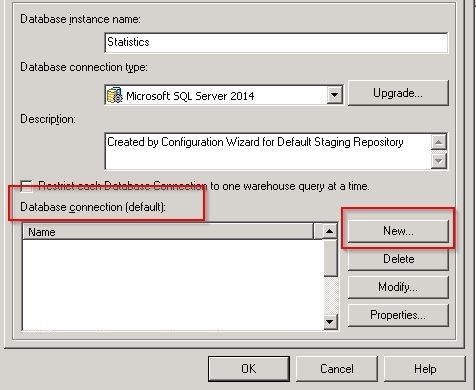
1) Edit the database instance object that is currently selected for statistics.
2) Create a new database connection object:

ka04W00000148S9QAI_0EM4400000029Ba.jpeg

3) In the advanced tab of the database connection object, select the checkbox to enable Parameterized queries.
4) Make sure to select the existing database login object or create a new one and save the changes.
5) Select the newly created DB connection object in the Statistics DB instance
6) Restart the Intelligence Server.
 
Note:
The issue has improved logging in Strategy 10.3 and newer. In these releases, the error in Kernel > EM Migration Trace will correctly point out that it was unable to read the option for parameterized queries.


Comment

0 comments

Details

Knowledge Article

Published:

April 17, 2017

Last Updated:

August 15, 2019