EducationSoftwareStrategy.com
StrategyCommunity

Knowledge Base

Product

Community

Knowledge Base

TopicsBrowse ArticlesDeveloper Zone

Product

Download SoftwareProduct DocumentationSecurity Hub

Education

Tutorial VideosSolution GalleryEducation courses

Community

GuidelinesGrandmastersEvents
x_social-icon_white.svglinkedin_social-icon_white.svg
Strategy logoCommunity

© Strategy Inc. All Rights Reserved.

LegalTerms of UsePrivacy Policy
  1. Home
  2. Topics

KB30087: How to capture SQL submitted by the Metadata Server in MicroStrategy 9.x


Community Admin

• Strategy


Article outlines the MSQL diagnostic that can be enabled to capture the SQL submitted by the Metadata Server.

In Strategy 9.x a new diagnostic component called "MSql" is introduced to replace the Metadata Server diagnostic component. In order to capture the SQL submitted by the Metadata Server, follow the steps below:

    1. Close all Strategy applications.
    2. Go to Start > All Porgrams > Strategy > Tools > Diagnostics Configuration
    3. If users would like to capture the SQL in 2-tier connection, in the "Select Configuration" drop-down list, select "Machine Default". Otherwise, users should select "CastorServer Instance".
    4. Go to the component "Metadata Server" and the dispatch "SQL Trace".
    5. Click on the drop down for the corresponding "File Log" and choose the log file to which the SQL Trace needs to be written into.

 
Note: Step 4 and 5 are optional. With Metadata Server SQL trace enabled, the log contains returned row count for each SQL statement. Users can decide if it's necessary to have the additional information.
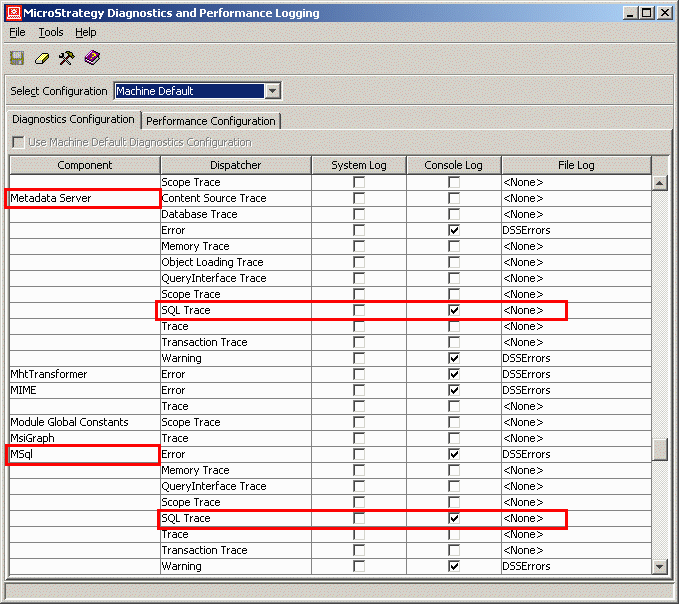
 

    1. Go to the component "MSql" and the dispatch "SQL Trace".
    2. Click on the drop down for the corresponding "File Log" and choose the log file to which the SQL Trace needs to be written into.
    3. Save and close the Diagnostics Configuration window.
ka04W000000OddkQAC_0EM440000002HUv.gif


Note:
1. Enabling the SQL tracing is used for troubleshooting purposes since performance can be greatly reduced due to intensive hard-disk access.
2. Starting from 10.x, MSql component is not available under "CastorServer Instance". Enabling dispatchers of MSql under "Machine default" in 10.x works for both 2-tier and 3-tier.


Comment

0 comments

Details

Knowledge Article

Published:

April 10, 2017

Last Updated:

April 10, 2017