EducationSoftwareStrategy.com
StrategyCommunity

Knowledge Base

Product

Community

Knowledge Base

TopicsBrowse ArticlesDeveloper Zone

Product

Download SoftwareProduct DocumentationSecurity Hub

Education

Tutorial VideosSolution GalleryEducation courses

Community

GuidelinesGrandmastersEvents
x_social-icon_white.svglinkedin_social-icon_white.svg
Strategy logoCommunity

© Strategy Inc. All Rights Reserved.

LegalTerms of UsePrivacy Policy
  1. Home
  2. Topics

KB300871: Error when data import via proxy using Google Drive, Dropbox or File from URL in MicroStrategy Web 10.3 and 10.4.


Community Admin

• Strategy


Error when data import via proxy using Google Drive, Dropbox or File from URL in MicroStrategy Web 10.3

SYMPTOM
When trying to do data import via proxy using Google Drive, Dropbox or File from URL in Strategy Web 10.3, multiple errors can show.
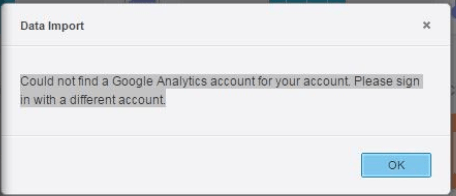
Below is an example for the error from Google Drive:
ka04W000000ObapQAC_0EM4400000025Rv.jpeg


"Could not find a google analytics account for your account. Please sign in with a different account"

 
NOTE: This only happens when Intelligence Server without any internet connection and can only access data source via proxy. Issue does not occur to Facebook or Twitter connector, but only happens to Google Drive, Dropbox and File from URL.
 
CAUSE
This is a known issue with Strategy 10.3 GA, 10.3 HF1 and 10.4 GA.
ACTION
This issue has been addressed with Strategy 10.3 HF2 and 10.4 HF1. Upgrade to Strategy 10.3 HF2, 10.4 HF1 or above in order to take advantage of the fix.


Comment

0 comments

Details

Knowledge Article

Published:

May 30, 2017

Last Updated:

May 30, 2017