EducationSoftwareStrategy.com
StrategyCommunity

Knowledge Base

Product

Community

Knowledge Base

TopicsBrowse ArticlesDeveloper Zone

Product

Download SoftwareProduct DocumentationSecurity Hub

Education

Tutorial VideosSolution GalleryEducation courses

Community

GuidelinesGrandmastersEvents
x_social-icon_white.svglinkedin_social-icon_white.svg
Strategy logoCommunity

© Strategy Inc. All Rights Reserved.

LegalTerms of UsePrivacy Policy
  1. Home
  2. Topics

KB300893: TM1 Cube shows no measures in MDX cube catalog in MicroStrategy Analytics Developer 10.2


Stefan Zepeda

Salesforce Solutions Architect • Strategy


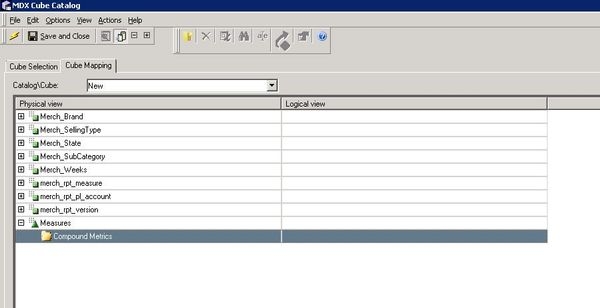
When TM1 cubes imported into MicroStrategy through MDX cube catalog, there are no measures shown in Cube Mapping Windows

SYMPTOM:
When TM1 cubes imported into Strategy through MDX cube catalog, there are no measures shown in Cube Mapping Windows, as showed below.
ka02R000000kaXMQAY_0EM440000002C0H.jpeg

CAUSE:
There is no "Measures Dimension" set under cube properties in TM1 Architect.
In order to import the a custom dimension as measures into MSTR, the cube property "Measures Dimension" needs to be set. Strategy relies on this setting to treat this dimension as measure. Otherwise, the dimension is imported as normal dimensions which contain attributes instead of metric.
ACTION:
Set "Measures Dimension" under cube properties, as showed below.

ka02R000000kaXMQAY_0EM440000002C0C.jpeg

 
This issue has been rectified in Strategy 10.3.2 and later versions as well.


Comment

0 comments

Details

Knowledge Article

Published:

April 14, 2017

Last Updated:

April 14, 2017