EducationSoftwareStrategy.com
StrategyCommunity

Knowledge Base

Product

Community

Knowledge Base

TopicsBrowse ArticlesDeveloper Zone

Product

Download SoftwareProduct DocumentationSecurity Hub

Education

Tutorial VideosSolution GalleryEducation courses

Community

GuidelinesGrandmastersEvents
x_social-icon_white.svglinkedin_social-icon_white.svg
Strategy logoCommunity

© Strategy Inc. All Rights Reserved.

LegalTerms of UsePrivacy Policy
  1. Home
  2. Topics

KB30098: Axis Labels that have been rotated in a Report do not appear rotated in Report Services Document when added as a data set in MicroStrategy Developer


Stefan Zepeda

Salesforce Solutions Architect • Strategy


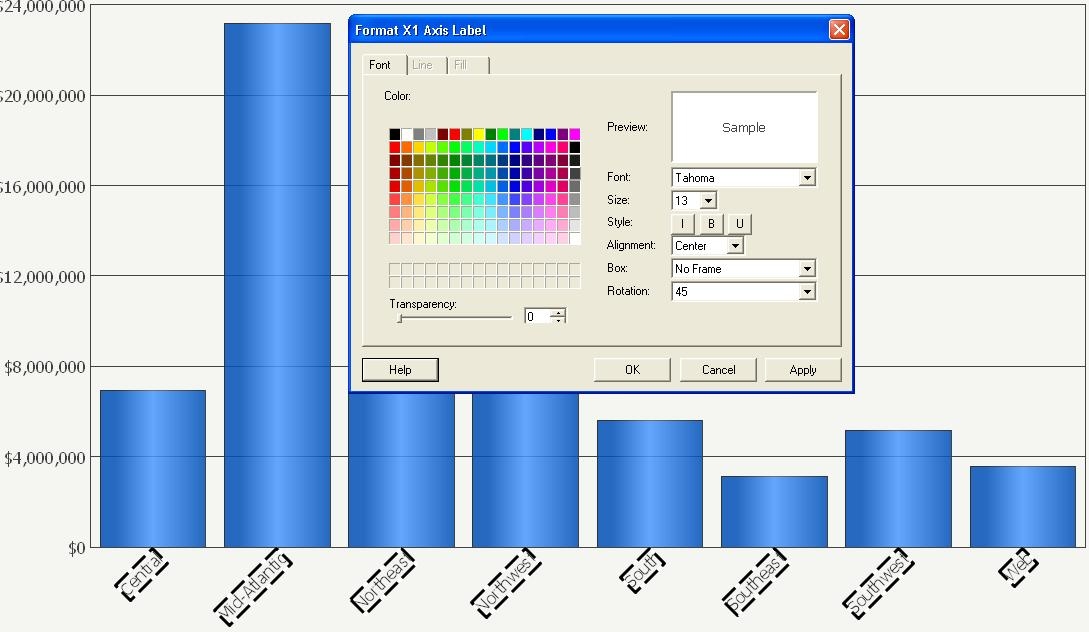
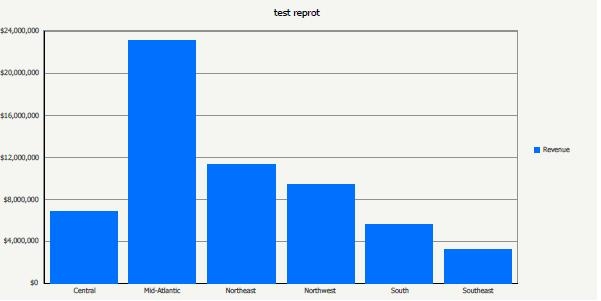
Axis Labels that have been rotated in a report do not appear rotated in Report Services document when added as a data set.

SYMPTOM:
Axis Labels that have been rotated in a report do not appear rotated in Report Services document when added as a data set.
 
A graph as it appears in a report:
 

ka02R000000kbrPQAQ_0EM440000002EUh.jpeg

 
The same graph as it appears in a Report Services document:
 

ka02R000000kbrPQAQ_0EM440000002EUf.jpeg

 
CAUSE:
The graph was not added to the document section with formatting.
 
ACTION:
There are two ways to maintain the label rotation.

  1. Drag the graph data set into the document while holding down the shift button.
  2. Right-click on the graph's data set and select 'Add to Section with Formatting.'


Comment

0 comments

Details

Knowledge Article

Published:

June 7, 2017

Last Updated:

June 7, 2017