EducationSoftwareStrategy.com
StrategyCommunity

Knowledge Base

Product

Community

Knowledge Base

TopicsBrowse ArticlesDeveloper Zone

Product

Download SoftwareProduct DocumentationSecurity Hub

Education

Tutorial VideosSolution GalleryEducation courses

Community

GuidelinesGrandmastersEvents
x_social-icon_white.svglinkedin_social-icon_white.svg
Strategy logoCommunity

© Strategy Inc. All Rights Reserved.

LegalTerms of UsePrivacy Policy
  1. Home
  2. Topics

KB30154: A tooltip on a bar chart will not show for a data value of 0 in Interactive Mode of a Report Services Document in MicroStrategy Web 9.0.X and 9.2.1


Community Admin

• Strategy


SYMPTOM:
A tooltip on a bar chart will not show for a data value of 0 in Interactive Mode of a Report Services Document in Strategy Web 9.0.x and 9.2.1
 
STEPS TO REPRODUCE:

  • Create a graph report that contains a data value of 0.
  • Set the graph style to be a bar chart and add it into a document.
  • Run the document in Interactive Mode and attempt to hover over the area where the bar would be.  Notice that the tooltip will not show:
     
ka04W000000OfwzQAC_0EM4400000028NB.jpeg
  • In Flash mode the tooltip shows up correctly:
     
ka04W000000OfwzQAC_0EM4400000028ND.jpeg

CAUSE:
This is a known issue in Strategy Web 9.0.X and 9.2.1
 
ACTION:
Contact Strategy Technical Support for an update on the status of this issue.
 
WORKAROUND:
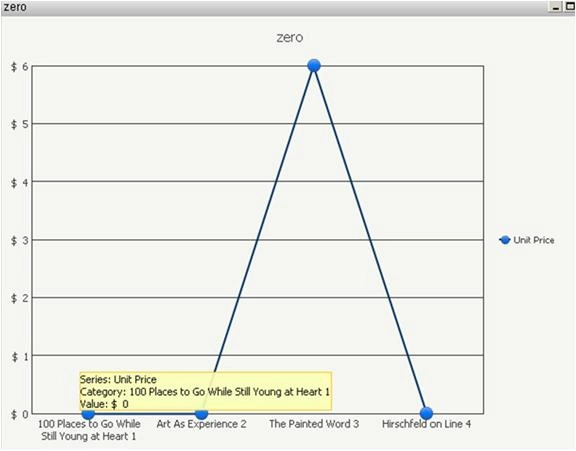
If a line graph is used instead of a bar graph, a tooltip will display:
 

ka04W000000OfwzQAC_0EM4400000028NO.jpeg


Comment

0 comments

Details

Knowledge Article

Published:

July 17, 2017

Last Updated:

July 17, 2017