SYMPTOM
While running Strategy Cube Advisor, the following error may be encountered after reports have been analyzed for Intelligent Cube structures that would satisfy those reports’ using the Dynamic Sourcing feature introduced into Strategy OLAP Services.
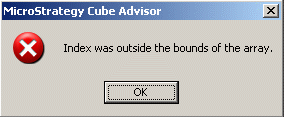
Index was outside the bounds of the array
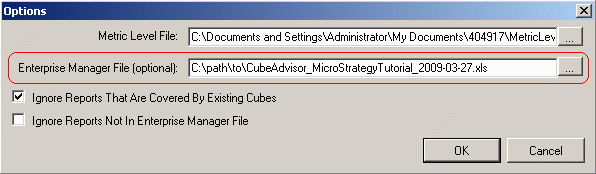
Strategy Cube Advisor can use auxiliary information from a Strategy Enterprise Manager report, “Report Request Statistics per Project,” to prioritize reports that are executed more often and maximize the impact of Dynamic Sourcing. This error may occur if an Enterprise Manager file is provided, while the Cube Advisor runs successfully without the Enterprise Manager file.
CAUSE
This error can occur because the Enterprise Manager file is in the wrong format. The file should be provided in plain text format, tab-delimited. It is not supported to use an .xls file here.
The general workflow of Strategy Cube Advisor is as follows:
If the file is a Microsoft Excel worksheet, Strategy Cube Advisor creates an invalid cube details file. Reading the corrupt file causes the above indexing error.
ACTION
Ensure that the Enterprise Manager data file is in the proper format.
The Strategy OLAP Services Guide PDF manual includes instructions to generate the Enterprise Manager data file, either from Strategy Developer Strategy Web. Exporting the Enterprise Manager report from Strategy Web, according to those instructions, will produce the file in the correct format. If the report is exported from Strategy Developer, it is necessary to open the Excel workbook in Microsoft Excel and resave it as Text (Tab delimited).

For more details on the use of Strategy Cube Advisor, consult the Strategy OLAP Services Guide PDF manual.
