EducationSoftwareStrategy.com
StrategyCommunity

Knowledge Base

Product

Community

Knowledge Base

TopicsBrowse ArticlesDeveloper Zone

Product

Download SoftwareProduct DocumentationSecurity Hub

Education

Tutorial VideosSolution GalleryEducation courses

Community

GuidelinesGrandmastersEvents
x_social-icon_white.svglinkedin_social-icon_white.svg
Strategy logoCommunity

© Strategy Inc. All Rights Reserved.

LegalTerms of UsePrivacy Policy
  1. Home
  2. Topics

KB30191: How to import only a subset of objects into the metadata using the Repository Translation Wizard 9.x and 10.x


Community Admin

• Strategy


This article describes a way to import translation for only a subset of available translations

The Repository Translation Wizard is a utility that allows users to import metadata object translations from a translation repository into the Strategy metadata.  Sometimes, it might be necessary to only import a subset of the objects found in the translations table. For instance, if a translator finishes only some of the translations, it may be desirable to import back into the metadata only the completed strings.
 
The Repository Translation Wizard allows users to set flags in the translations table to control which strings are imported back into the metadata. A flag is any character allowed by the database. When the Repository Translation Wizard is used to import the strings into the metadata, the user can identify this character for the system to use during the import process.
 
Follow the steps below to set flags and import only the objects associated with them.


ka04W000000OgixQAC_0EM440000002HUs.jpeg


ka04W000000OgixQAC_0EM440000002HUu.jpeg
  1. Generate a translations repository with exported metadata objects using the Repository Translation Wizard.
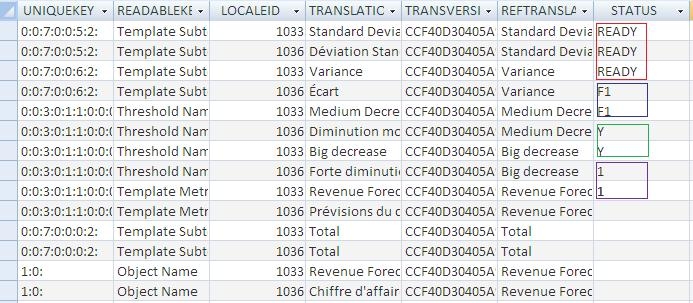
  2. In the translations table generated during the export process there is a column "Status", this is where the flags are directly set by the user. One may create as many flags as needed.
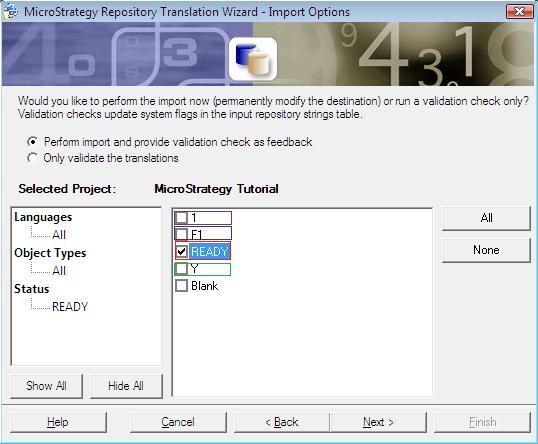
  3. In the Import Options page of the Translation Repository Wizard, under Status, the user will find a list of all  flags defined. Only the objects associated to the selected flags will be imported back into the metadata.

Comment

0 comments

Details

Knowledge Article

Published:

June 12, 2017

Last Updated:

June 12, 2017