SYMPTOM:
Users that rename a project through Developer will notice that the name is rolled back to the original name after disconnecting and reconnecting to the project source even if apparently the name changed at the moment of renaming it.
The problem happens both in 2-Tier and 3-Tier when the Desktop Interface Language is set to any value different than English. Unloading and reloading the project as well as closing and re-opening Desktop will not solve the problem.
STEPS TO REPRODUCE:
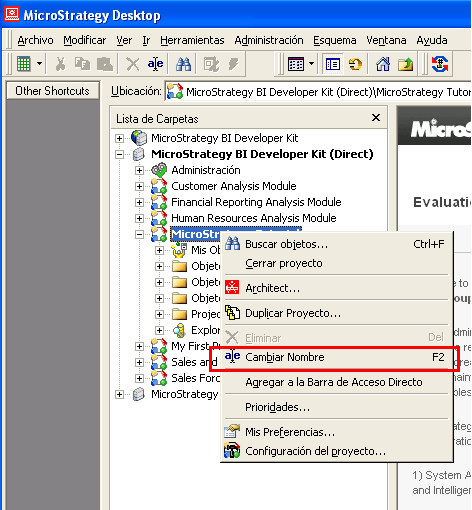
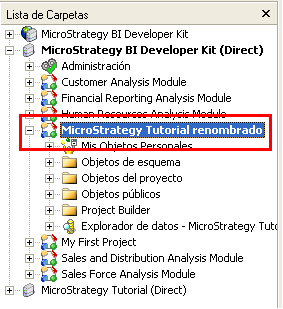
Follow the steps below to reproduce this issue in the Strategy Tutorial project:
CAUSE:
This is a known issue in Strategy 9.0.0
ACTION:
Contact Strategy Technical Support for an update on the latest status of this issue.
WORKAROUND:
Go to Project Configuration > Language > User Preferences and set the 'Metadata language preference for all users in this project' to the same value as your Desktop Interface Language setting.
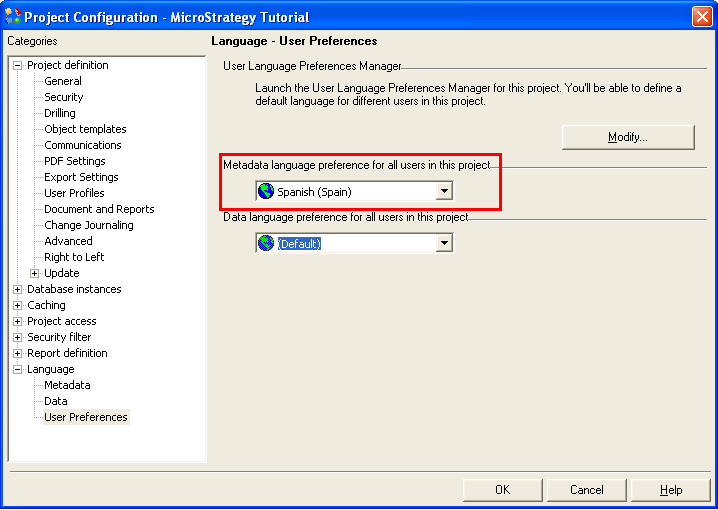
Disconnect and re-connect in 2-Tier or unload and reload the project in 3-Tier. Try to rename the project again. This time it should work fine.
Note: Users should be aware of the functionality provided by the Metadata Internationalization feature in Strategy 9 before performing the workaround provided above.
